
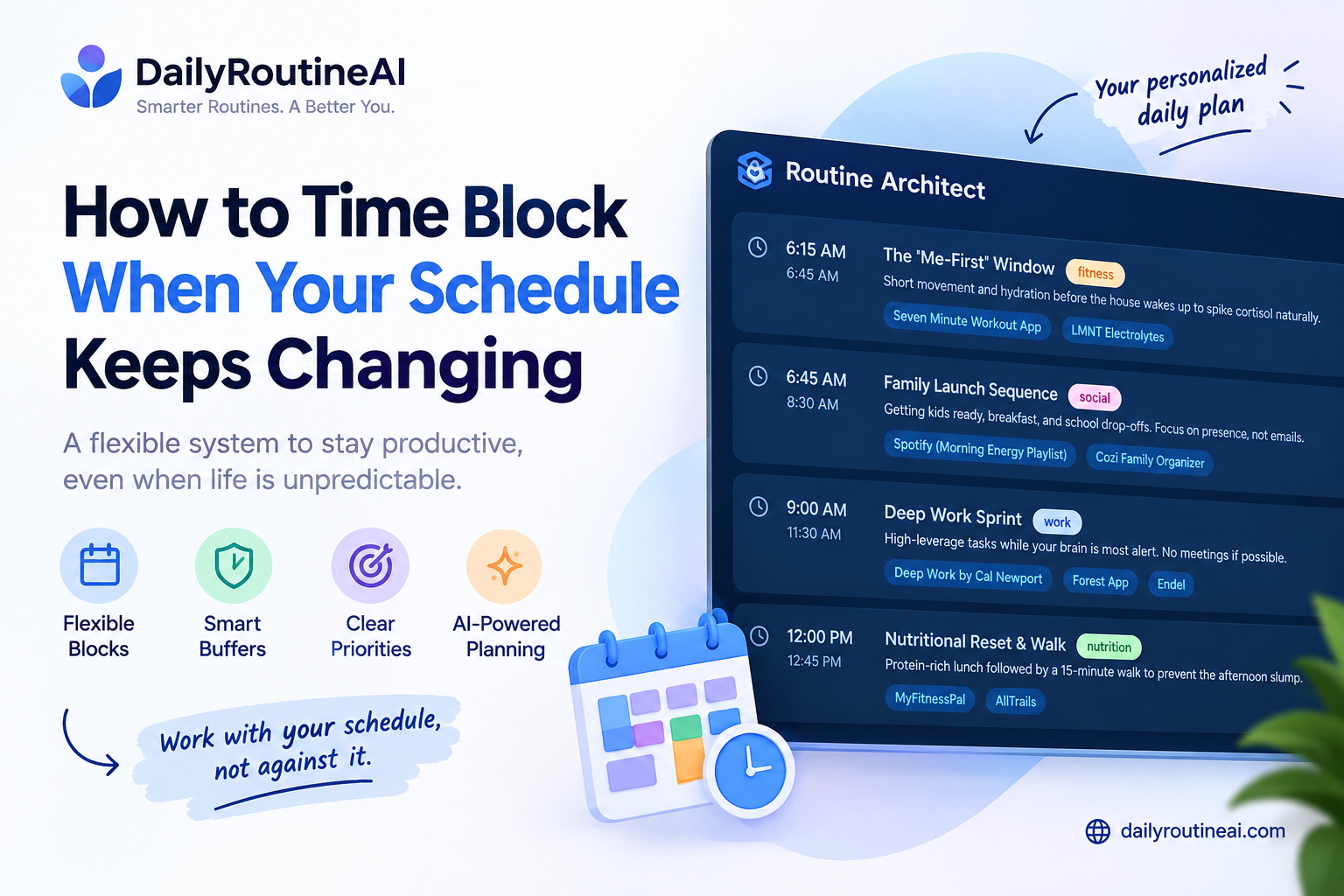
Time blocking sounds simple until you have a changing schedule that refuses to follow the plan.
A meeting runs 30 minutes late. A client sends an urgent revision. A task takes twice as long as expected. Your energy drops in the afternoon. A family responsibility appears. Suddenly, the carefully planned calendar you created that morning no longer matches reality.
This is where many people make the wrong adjustment.
They try to create an even more detailed schedule.
But if you are learning how to time block when your schedule keeps changing, the answer is not more rigidity. An unpredictable schedule needs a planning system that can change without losing the day’s priorities.
That is the difference between traditional time blocking and flexible time blocking.
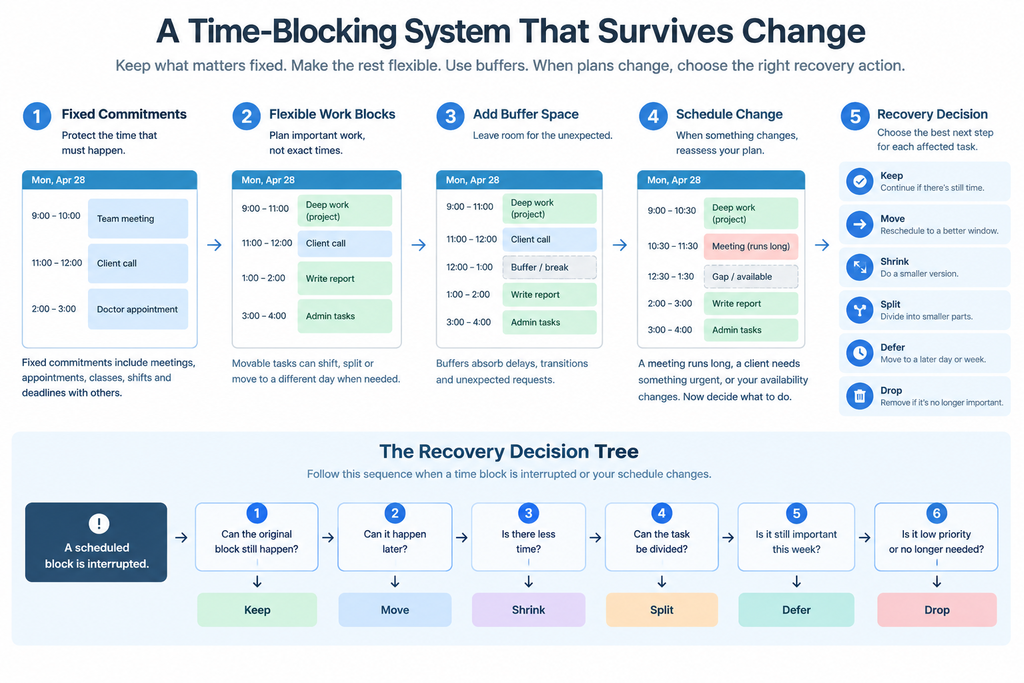
Instead of deciding that every task must happen at one exact time, you separate your day into fixed commitments, flexible work windows, recovery time, and priority levels.
When something changes, you adjust the flexible parts instead of rebuilding the entire day.
For people whose schedules frequently change, the goal is not to create a perfect calendar.
The goal is to create a calendar that can survive reality.
What Is Flexible Time Blocking?
Flexible time blocking is a time-management method where some parts of the day are fixed while other work can move according to changing circumstances.
A traditional schedule might look like this:
| Time | Activity |
|---|---|
| 8:00–9:00 | Writing |
| 9:00–10:00 | Research |
| 10:00–11:00 | Client work |
| 11:00–12:00 | |
| 1:00–2:00 | Project work |
| 2:00–3:00 | Administration |
The problem appears when the 9:00–10:00 task takes longer.
The 10:00 task moves.
Then the 11:00 task moves.
By afternoon, the entire schedule has shifted.
Flexible time blocking uses a different structure:
| Type | Example |
|---|---|
| Fixed commitment | Client meeting |
| Priority block | Important project |
| Flexible block | Research or writing |
| Buffer | Unexpected work |
| Recovery block | Unfinished priority |
| Optional work | Low-priority tasks |
The schedule still has structure, but not everything is treated as immovable.
Why Time Blocking Breaks When Your Schedule Changes
The biggest problem with rigid time blocking is that it assumes the original estimate will remain correct.
Real work rarely behaves that way.
A task estimated at 45 minutes can take 90 minutes because:
- The research is more complicated.
- A technical problem appears.
- Someone requests additional information.
- You have to switch between systems.
- The task requires more concentration than expected.
Meetings can also change the schedule.
A meeting scheduled from 10:00 to 10:30 may actually consume more time when preparation, the meeting itself, notes, and follow-up are included.
That means a calendar showing a free 30-minute period does not necessarily mean you have 30 minutes of usable work capacity.
Flexible scheduling accounts for that difference.
The Three Types of Time You Need
A changing schedule becomes easier to manage when your calendar contains three different types of time.
1. Fixed Time
Fixed time is connected to something you cannot easily move.
Examples include:
- Meetings
- Appointments
- Classes
- Interviews
- School pickup
- Scheduled calls
- Live events
- Hard deadlines
These should normally be placed on the calendar first.
2. Flexible Work Time
Flexible work is important but does not always need to happen at one exact minute.
Examples include:
- Writing
- Research
- Coding
- Editing
- Administrative work
- Learning
- Exercise
- Planning
Instead of saying:
Write article from 9:00 to 10:00.
You can define:
Complete one focused writing session during the morning work window.
That small change makes the schedule much easier to recover when something unexpected happens.
3. Recovery Time
Recovery time is the space that allows the schedule to absorb changes.
It can be used when:
- A meeting runs late.
- A task takes longer.
- An urgent request arrives.
- You lose a planned block.
- You need additional preparation.
- You need to move unfinished work.
A recovery block is not empty calendar space.
It is part of the scheduling system.
Step 1: Put Fixed Commitments First
Start with the things that cannot easily move.
For example:
| Commitment | Time |
|---|---|
| Client meeting | 10:00–10:30 |
| Lunch | 1:00–1:45 |
| Appointment | 4:00–5:00 |
| School pickup | 5:30–6:00 |
Only after these are visible should you start placing flexible work around them.
This prevents the common mistake of scheduling several hours of deep work and then discovering that meetings and other commitments have already consumed most of the usable day.
Step 2: Calculate Your Real Working Capacity
An eight-hour workday does not automatically provide eight hours of productive capacity.
Consider a hypothetical eight-hour workday:
| Activity | Time |
|---|---|
| Total available time | 8 hours |
| Meetings | 2 hours |
| Lunch/breaks | 1 hour |
| Transition time | 30 minutes |
| Buffer | 1 hour |
| Remaining planned-work capacity | 3.5 hours |
The important number is not eight hours.
It is the approximately 3.5 hours remaining for planned work.
This is why an overloaded calendar can look reasonable on paper but fail in practice.
Your actual capacity is determined by what remains after fixed commitments, breaks, transitions, and uncertainty.
Step 3: Separate Must-Do Work From Movable Work
Create three levels.
Must happen
These are the tasks that create significant consequences if they are not completed today.
Important
These matter but can usually move without causing an immediate problem.
Optional
These are useful but can be removed when the day becomes overloaded.
For example:
| Priority | Task |
|---|---|
| Must | Submit client deliverable |
| Must | Attend scheduled meeting |
| Important | Research next article |
| Important | Update project documentation |
| Optional | Organize old files |
| Optional | Explore a new productivity app |
When an unexpected event consumes an hour, the optional work should not compete with the deadline.
Step 4: Stop Treating Every Task as a One-Hour Block
Tasks do not all need the same block size.
A useful flexible schedule contains different work units.
15-minute tasks
- Reply to an important message.
- Review a document.
- Confirm an appointment.
- Update a project.
- Make a short phone call.
30-minute tasks
- Edit a section.
- Review analytics.
- Prepare meeting notes.
- Research one small topic.
- Complete administrative work.
60-minute tasks
- Write a substantial article section.
- Work on a client project.
- Analyze a report.
- Complete focused research.
90-minute tasks
- Deep research.
- Complex writing.
- Coding.
- Strategic planning.
- Large creative projects.
This gives you options when your schedule suddenly changes.
If you unexpectedly have 25 minutes, you do not need to force a 90-minute task into the gap.
Step 5: Use Time Windows for Flexible Work
A time window gives a task a place in your day without making the exact start time sacred.
For example:
Morning focus window: 8:30–11:00
Communication window: 11:00–12:00
Afternoon production window: 1:30–3:30
Recovery window: 3:30–4:30
Within those windows, work can move according to what happens.
This is particularly useful for freelancers, business owners, remote workers, consultants, and people who regularly receive unexpected requests.
Step 6: Add Buffer Before Your Schedule Needs It
A common mistake is adding buffer only after experiencing several scheduling failures.
Buffer should exist from the beginning.
For example:
8:00–9:00    Deep work
9:00–9:15    Buffer
9:15–10:00   Flexible work
10:00–10:30  Meeting
10:30–10:45  Recovery / transition
10:45–12:00  Priority work
12:00–1:00   Lunch
1:00–2:00    Flexible work
2:00–2:30    Buffer
2:30–4:00    Priority project
If nothing goes wrong, buffer can remain available.
If something does go wrong, the buffer protects the rest of the schedule.
Step 7: Build Your Day Around Anchors
An anchor is an event or activity around which the rest of the day can be organized.
Common anchors include:
- Wake-up time
- Work start
- Fixed meetings
- Meals
- School pickup
- Exercise
- Shift start
- Shift end
- Sleep time
Instead of asking:
“Where can I put every task?”
Ask:
“What parts of my day are already determined?”
Then build the flexible work around those anchors.
This is especially useful when the working hours change from day to day.
Using Routine Architect for a Changing Schedule
This is where a routine-oriented AI planner is different from a conventional calendar.
DailyRoutineAI’s Routine Architect starts with a conversational planning approach rather than requiring the user to begin by manually constructing a complex calendar.
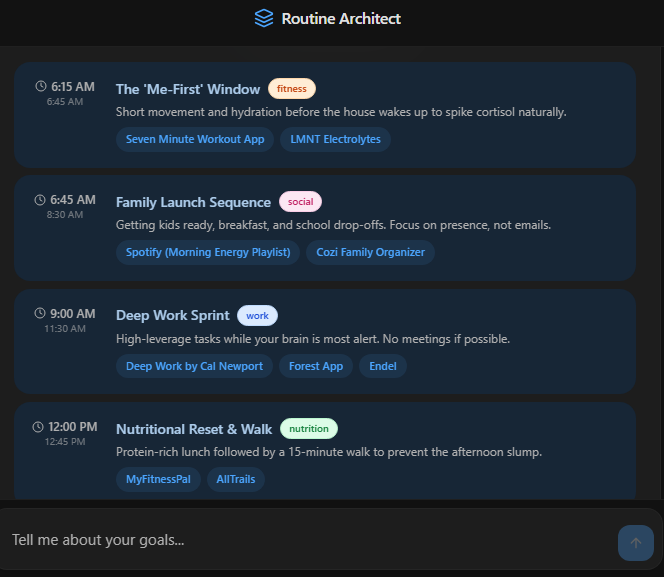
The current interface begins with “Design your ideal day” and asks the user to provide information about goals and lifestyle. The stated purpose is to create a tailored daily schedule and identify tools that can support the habits within that routine.
Open DailyRoutineAI’s Routine Architect
That matters when schedules change because the planning problem is often bigger than:
“Where should I put this task?”
The real problem can be:
“How should my day be structured around my goals, responsibilities, habits, and available time?”
Routine Architect is positioned around that broader planning problem.
For example, a person may want to:
- Work on an important project.
- Exercise.
- Read.
- Maintain a consistent sleep routine.
- Handle work responsibilities.
- Protect personal time.
A simple calendar can display those activities.
A routine-oriented planner starts from the question of how those activities should fit into the person’s overall day.
That distinction is important.
A calendar primarily represents scheduled events.
A task manager primarily stores work that needs to be completed.
A routine planner can focus on the structure connecting goals, habits, lifestyle, and daily execution.
What Happens When the Routine Changes?
A changing schedule does not mean the entire routine has to be abandoned.
Suppose the original structure is:
| Period | Activity |
|---|---|
| Morning | Deep work |
| Late morning | Communication |
| Afternoon | Project work |
| Evening | Exercise |
| Night | Reading and wind-down |
Now imagine the morning meeting gets extended.
The answer is not necessarily to delete the entire day’s routine.
Instead:
- Move deep work to the next available high-focus period.
- Reduce optional work.
- Preserve essential habits.
- Keep the evening shutdown structure.
- Move unfinished work rather than duplicating it.
The structure survives even when individual blocks move.
That is one of the most important principles of flexible scheduling.
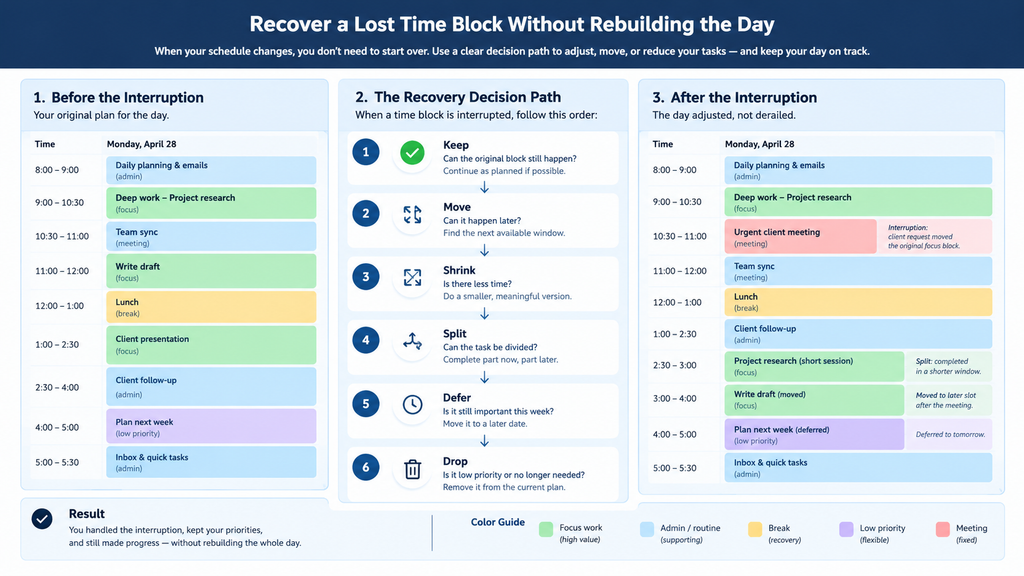
The Keep, Move, Shrink, Split, Defer, Drop Method
When a block is interrupted, use six possible decisions.
Keep
Continue the task if enough time remains to make meaningful progress.
Move
Move the entire task to another realistic window.
Shrink
Reduce the scope.
Instead of:
Complete the full report.
Change it to:
Complete the executive summary.
Split
Break the work into smaller sessions.
For example:
- 30 minutes of research.
- 30 minutes drafting.
- 30 minutes editing.
Defer
Move the task to another day when it is important but not urgent.
Drop
Remove it when it no longer deserves the time.
This prevents the common habit of moving the same unfinished task from one calendar slot to another indefinitely.
A Realistic Example of a Changing Workday
Consider a freelancer with:
- A client meeting at 10:00.
- A proposal due today.
- Two hours of research.
- Email responsibilities.
- A project requiring focused work.
The initial plan could be:
| Time | Work |
|---|---|
| 8:00–9:00 | Research |
| 9:00–10:00 | Proposal |
| 10:00–10:30 | Client meeting |
| 10:30–11:30 | Proposal |
| 11:30–12:00 | |
| 1:00–2:00 | Research |
| 2:00–3:00 | Project |
| 3:00–4:00 | Buffer |
Now suppose the client meeting runs until 11:00 and creates an urgent revision.
The original schedule is no longer realistic.
A flexible version becomes:
| Time | Revised work |
|---|---|
| 8:00–9:00 | Research |
| 9:00–10:00 | Proposal |
| 10:00–11:00 | Client meeting |
| 11:00–11:20 | Revision notes |
| 11:20–12:00 | Proposal |
| 12:00–1:00 | Break/buffer |
| 1:00–2:00 | Proposal completion |
| 2:00–2:30 | Client follow-up |
| 2:30–3:00 | Research |
| 3:00–4:00 | Project or recovery |
The project block is now flexible.
The proposal remains protected because it has the stronger deadline.
Nothing was “failed.”
The priorities changed the allocation of the remaining capacity.
Time Blocking for Shift Workers
A changing schedule is especially common for shift workers.
A traditional time-blocking system often assumes:
Morning → work → afternoon → evening → sleep.
That structure does not work for everyone.
A better approach is to anchor the routine around:
- Actual wake time.
- Shift start.
- Shift end.
- Commute.
- Meals.
- Recovery.
- Sleep.
For example, a night-shift worker may have a routine structured around the period after waking rather than around conventional morning hours.
The same principle applies to rotating schedules.
The routine should follow the person’s actual day rather than forcing the person into a standard calendar template.
Time Blocking for Freelancers
Freelancers face a different problem because their schedules can be controlled by other people.
A single day may contain:
- Client meetings.
- Writing.
- Revisions.
- Sales.
- Email.
- Research.
- Invoicing.
- Unexpected requests.
A flexible system therefore needs separate blocks for:
Client commitments
Production
Communication
Administration
Recovery
If every available hour is assigned to client production, the schedule becomes unrealistic because communication and administration still consume time.
Time Blocking for Meeting-Heavy Professionals
Meeting-heavy schedules require smaller flexible blocks.
For example:
9:00–9:30   Meeting
9:30–9:45   Recovery
9:45–10:15  Focus block
10:15–11:00 Meeting
11:00–11:20 Notes / follow-up
11:20–12:00 Focus block
Trying to schedule a three-hour deep-work session between frequent meetings is usually unrealistic.
Instead, break larger projects into smaller working sessions.
This is also how some dedicated timeboxing software handles fragmented schedules.
Sunsama, for example, documents automatic scheduling around calendar events and can split longer tasks across multiple available blocks. Its documentation states that tasks longer than one hour are readily split to fill available time, while shorter tasks are split when necessary.
What Time-Blocking Software Can Actually Do
Modern time-blocking software can go beyond manually dragging tasks onto a calendar.
Sunsama’s current documentation, for example, supports manually dragging tasks onto a calendar, automatic scheduling, working-hour schedules, task splitting, and automatic rescheduling when conflicts occur.
Its auto-scheduler avoids overlapping tasks with calendar events and can move work to another day when there is no available capacity.
This creates an important distinction between two approaches.
Manual flexible time blocking
You decide:
- What matters.
- When it should happen.
- What moves.
- What gets dropped.
- Where the buffer goes.
Automated time blocking
Software helps decide:
- Where tasks fit.
- Which available windows exist.
- Whether a task should be split.
- Where conflicts can be avoided.
- How work can move when the calendar changes.
Neither approach eliminates the need for judgment.
Automation can rearrange available time.
It cannot automatically know that an important client deadline matters more than an optional research task unless the system has the necessary context.
Time Blocking vs AI Routine Planning
These approaches overlap, but they are not identical.
| Planning approach | Main question |
|---|---|
| To-do list | What needs to be done? |
| Calendar | What is scheduled? |
| Time blocking | When will I work on it? |
| Automated scheduler | Where can the work fit? |
| AI routine planner | How should my day be structured around my goals and lifestyle? |
This is why Routine Architect and a calendar-based scheduler should not automatically be treated as identical products.
Routine Architect’s current interface is built around collecting information about goals and lifestyle and producing a tailored daily schedule.
Calendar-focused products such as Sunsama are more directly centered on bringing tasks and calendar availability together and placing work into time blocks. Sunsama’s documentation describes timeboxing tasks directly onto calendars and automatically scheduling them around existing calendar events.
The difference is the starting point.
One starts with:
“How should my day work?”
The other can start with:
“Where can this task fit on my calendar?”
Both can be useful, but they solve different parts of the planning problem.
The Most Important Rule: Protect Priorities, Not Calendar Slots
A common mistake is becoming emotionally attached to the original calendar.
Suppose you planned:
9:00–10:30 — Important project
Then an unexpected event consumes 9:00–10:00.
The objective is not to preserve the 9:00 start time.
The objective is to preserve the important project.
That may mean:
- 10:00–11:00
- 1:00–2:00
- 2:30–3:30
- Two separate 30-minute blocks
- A smaller version today and the rest tomorrow
The calendar slot can change.
The priority does not have to disappear.
The Daily Reset
When the day changes significantly, stop and perform a short reset.
Ask:
What is already completed?
Remove completed work from your mental workload.
What fixed commitments remain?
These determine the remaining structure.
What is the most important unfinished task?
Protect that first.
Which blocks are now unrealistic?
Remove or move them.
What can be reduced?
Shrink large tasks where necessary.
What can wait?
Move lower-priority work instead of overloading the remaining hours.
This prevents a bad morning from becoming a bad entire day.
How to Handle an Overloaded Day
An overloaded schedule needs subtraction.
Do not simply add another block.
Use this order:
1. Remove optional work.
2. Reduce the scope of important work.
3. Split large tasks.
4. Move non-urgent work.
5. Protect deadlines.
6. Preserve essential routines and recovery.
This produces a schedule that is smaller but more achievable.
The Difference Between a Flexible Schedule and a Disorganized Schedule
Flexibility does not mean having no plan.
A disorganized schedule might look like:
I’ll work on whatever seems urgent.
A flexible schedule looks like:
These are my fixed commitments. These are today’s essential outcomes. These are the flexible work windows. This is my recovery capacity. If something changes, I know what moves first.
The difference is decision structure.
You are not eliminating planning.
You are planning for change.
Frequently Asked Questions
How do you time block when your schedule changes every day?
Start with fixed commitments, identify your most important outcomes, create flexible work windows, and reserve recovery time. Do not assign every task to an irreversible time slot.
How much buffer should you leave between time blocks?
There is no universal number. The right amount depends on how often your schedule changes and how much transition time your work requires. A useful starting point is to deliberately leave unassigned periods rather than scheduling every available minute.
What should I do when I miss a time block?
Decide whether to keep, move, shrink, split, defer, or drop the task. The correct choice depends on the task’s priority and the amount of remaining capacity.
Is time blocking bad for people with unpredictable schedules?
No. Rigid time blocking can be difficult for unpredictable schedules, but flexible time blocking is specifically designed to accommodate changes.
Should I schedule every task?
No. Fixed commitments should generally receive exact times. Flexible work can be organized into windows, priority queues, or movable blocks.
Can AI help with changing schedules?
Yes. Some AI scheduling tools can automatically place or move tasks around calendar commitments. Sunsama, for example, documents auto-scheduling, conflict avoidance, task splitting, and automatic rescheduling.
AI routine planning addresses a related but broader problem: turning goals, lifestyle information, habits, and priorities into a daily structure. DailyRoutineAI’s Routine Architect currently follows this conversational approach.
What is the difference between Routine Architect and a normal calendar?
A normal calendar primarily represents scheduled events and appointments.
Routine Architect starts from information about the user’s goals and lifestyle and is designed to produce a tailored daily schedule.
The distinction is between managing existing time commitments and designing a daily routine around the person.
Can I use flexible time blocking without an app?
Yes. The method can be implemented with a paper planner, spreadsheet, calendar, or task manager. The important part is the structure: fixed commitments, flexible work, priorities, buffers, and recovery decisions.
Final Takeaway
When your schedule keeps changing, the answer is not to create a more rigid timetable.
Build a schedule that expects change.
Start with fixed commitments.
Protect the most important work.
Use flexible windows for movable tasks.
Leave real capacity between demanding activities.
Keep recovery time available.
When something goes wrong, do not automatically push every task forward.
Instead:
Keep it.
Move it.
Shrink it.
Split it.
Defer it.
Drop it.
The strongest time-blocking system is not the one that produces the most detailed calendar.
It is the one that still works after the calendar changes.
And that is where the distinction between ordinary time management and AI-assisted routine planning becomes important. A calendar can tell you where your commitments are. A time-blocking system can help you decide when to work. A routine-oriented system such as DailyRoutineAI’s Routine Architect starts one level earlier by using goals and lifestyle context to build a personalized daily structure.
When the day changes, the objective is not to protect the original schedule.
Protect the life and work the schedule was created to support.