Many daily planners assume that your day starts in the morning, your work happens during the day, and bedtime comes at night. That structure makes little sense when you work a night shift.
A night-shift worker might finish work when most people are starting their day. Personal responsibilities can fall between shifts, sleep, commuting, meals, and preparation for the next shift. When the schedule changes, a routine that worked yesterday may no longer fit.
An AI daily planner can help organize those moving pieces. The important part is how you use it. AI should not simply fill every available hour with tasks. It should work around your actual shift, fixed commitments, priorities, and the time you need to rest.
Research from the National Institute for Occupational Safety and Health (NIOSH) recognizes that nonstandard schedules, including night work and extended hours, can affect sleep and contribute to work-related fatigue. A 2026 meta-analysis covering 48 studies also found significantly higher sleepiness during night shifts compared with day shifts, with particularly high sleepiness reported during the first night shift in a block.
That makes flexible daily planning especially useful for people whose working hours don’t follow a conventional daytime schedule.
What Is an AI Daily Planner for Shift Workers?
An AI daily planner is a planning system that uses artificial intelligence to organize your tasks around the information you provide.
For a shift worker, that information can include your work hours, commute, appointments, personal responsibilities, priorities, and available time.
The important distinction is that you are not asking AI to decide when you should work. Your shift already exists. The job of the planner is to organize the rest of your day around it.
For example, someone working from 10 p.m. to 6 a.m. has a very different planning problem from someone working from 9 a.m. to 5 p.m. The same daily template shouldn’t automatically be applied to both.
A useful AI routine starts with the worker’s real constraints and then places flexible activities around them.
It is also worth keeping expectations realistic. AI can organize information and suggest a routine, but it cannot know whether a particular plan works for you unless you provide enough context and review the result yourself.
Why Night Shift Workers Need a Different Daily Planning Approach
The biggest problem with conventional daily planning is that it is usually built around the clock rather than the person’s actual schedule.
For a night-shift worker, the beginning of the workday may happen in the evening. The end of the workday may be early the next morning. The period that other people use for errands or appointments may overlap with the worker’s sleep period.
NIOSH explains that night work can interfere with the normal relationship between the body’s sleep pressure and circadian wakefulness. It also notes that sleeping during the day can be difficult for night workers.
That doesn’t mean every night-shift worker needs the same routine. It means the planner needs to account for the unusual structure of the day.
A 2025 systematic review examining 28 studies involving 1,519 shift workers also looked at experiences involving sleep disturbance, fatigue, and healthy behaviors. The findings reinforce the fact that shift workers don’t all experience their schedules in the same way.
That variation matters when creating an AI routine. A useful plan needs to be personal rather than based on a generic “night shift routine.”
What to Give an AI Before It Builds Your Daily Plan
The quality of an AI-generated routine depends heavily on the information you provide.
Start with your actual shift. Give the AI the start and end time rather than simply saying that you work nights.
Then add the commitments that cannot move.
These might include an appointment, picking up children, attending a class, completing an important work-related task, or handling another responsibility.
After that, list the tasks you would like to complete, but that have some flexibility. This distinction is important because a planner should know which activities can move when the day changes.
Your input can include:
- Shift start and end time
- Commute time
- Fixed appointments
- Family responsibilities
- Important personal tasks
- Study or work commitments
- Preferred activity times
- Flexible tasks
- Things that can wait until another day
For example, instead of telling an AI, “Create my routine,” give it something closer to:
“I work from 10 p.m. to 6 a.m. My commute takes [insert actual time]. I have a fixed appointment at [insert time]. I need to complete [task]. I also need time for personal responsibilities. Build a realistic daily plan around these fixed commitments and leave flexible time rather than filling every available hour.”
The more accurately you describe the day, the less likely the resulting plan is to ignore an important constraint.
How to Build an AI Daily Planner Around a Night Shift
Building the routine is easier when you do it in stages rather than asking AI to solve everything at once.
Start With the Actual Shift
Enter the exact working period first.
This is especially important when the shift crosses midnight. A shift that starts at 10 p.m. and ends at 6 a.m. technically belongs to two calendar dates, but from the worker’s perspective it may be one continuous work period.
The planner needs to understand this before it starts placing other activities.
Add Fixed Commitments
Next, add anything that cannot easily be moved.
Appointments, family responsibilities, classes, and other fixed commitments should take priority over flexible tasks.
This prevents the AI from creating a schedule that looks productive on paper but conflicts with something you actually have to do.
Add the Day’s Priorities
Now identify what genuinely needs to get done.
Don’t turn every task into a priority. If everything is urgent, the planner has little room to make sensible decisions when the schedule changes.
Separate essential tasks from activities that can be postponed.
Add Flexible Time
This is one of the easiest parts of a routine to overlook.
A schedule that fills every available minute leaves no room for delays, unexpected responsibilities, or simply having a less productive day.
AI can suggest where flexible tasks fit, but you don’t have to accept every suggestion.
Review the Generated Plan
Finally, read the schedule as a real person would.
Can you actually move from one activity to the next? Did the planner forget your commute? Did it place unnecessary tasks into an already demanding part of the day? Did it assume you have more available time than you really do?
If the answer is yes, change the instructions and generate a revised plan.
AI-generated does not mean automatically correct.
Example: AI Daily Planner for a Night Shift
Consider a worker whose overnight shift runs from 10 p.m. to 6 a.m.
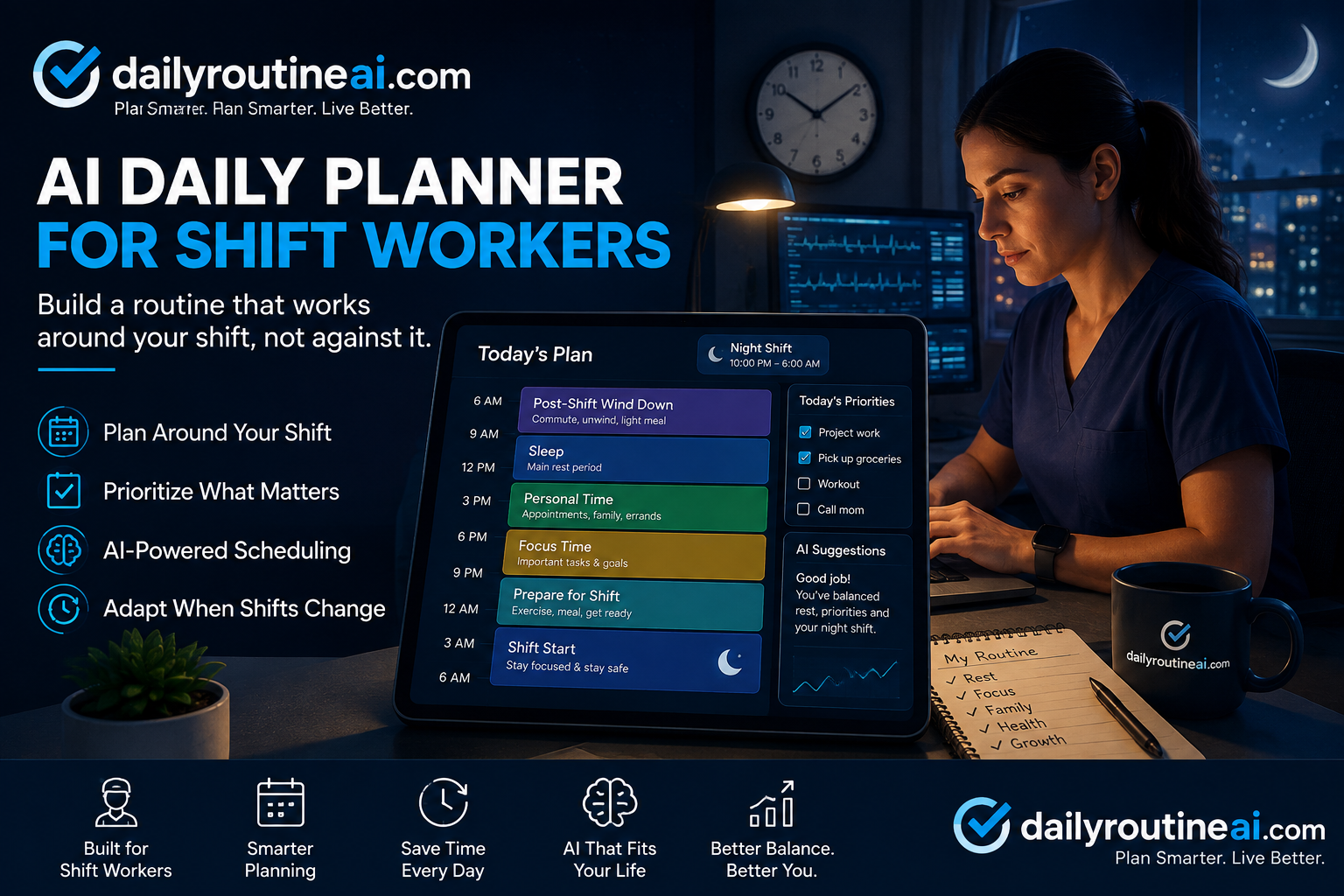
A simple routine could be structured around the shift like this:
| Part of the Day | Main Focus |
|---|---|
| After the shift | Travel home and transition out of work |
| Morning | Protected personal/rest period |
| Daytime | Main rest period and essential commitments |
| Afternoon | Flexible personal tasks |
| Evening | Preparation for work and required responsibilities |
| 10 p.m.–6 a.m. | Work shift |
This is an example structure, not a recommended schedule for every night-shift worker.
NIOSH guidance for night-shift workers emphasizes the importance of prioritizing sleep after returning home and avoiding unnecessary chores or errands during that early post-shift period. That is one reason an AI planner shouldn’t automatically treat every hour after a shift as free time for productivity.
The exact routine should depend on the worker’s circumstances, responsibilities, and schedule.
If you are building a routine with AI, you can tell it which parts of your day are fixed and which parts can move. That gives the planner a much better basis for organizing the remaining activities.
Planning the Day After a Night Shift
The day after a night shift deserves separate consideration.
A worker finishing an overnight shift may not have the same usable time or energy for personal tasks as someone finishing a daytime shift. NIOSH notes that nonstandard schedules can create challenges around obtaining sufficient rest and recovery.
For that reason, an AI planner should not simply look at the number of hours remaining in the calendar day and try to fill them.
Instead, tell the AI what the next day actually looks like.
If there is another night shift, the plan may need to protect the time needed to prepare for that shift. If it is a day off, flexible responsibilities can be distributed differently.
The point isn’t to create one perfect schedule. It is to make the plan reflect what the worker’s next 24 hours actually contain.
Using Different Daily Plans for Different Shift Types
A worker who rotates between day and night shifts shouldn’t necessarily use one identical routine every day.
Different shift types create different planning constraints.
Night Shift
The plan is built around an overnight working period, with personal responsibilities organized around the shift.
Evening Shift
The worker may have more usable daytime hours, but the work period still affects when appointments, errands, and personal activities can fit.
Day Shift
The routine can be organized around daytime work, with personal activities placed before or after the shift.
Day Off
A day off doesn’t have to use the same structure as a workday. Flexible tasks, appointments, personal projects, and downtime can be organized differently.
Rotating Shifts
This is where an adaptable planner becomes particularly useful. Instead of forcing the same routine onto every day, you can give the AI the upcoming shift and ask it to reorganize the day’s flexible activities around it.
Research has found that sleepiness can vary according to factors such as shift type, shift length, and the number of consecutive shifts. That supports the basic planning principle: don’t assume that every shift day is interchangeable.
What an AI Daily Planner Should Prioritize
An effective routine isn’t simply a list of everything you want to accomplish.
It needs to understand priorities and constraints.
Work commitments come first because they are usually fixed. Other non-negotiable responsibilities come next. Flexible tasks can then be placed around those commitments.
The planner should also leave room that isn’t assigned to a task.
This is particularly important for shift workers because their schedules may change, and the demands of one day may not resemble the next.
NIOSH identifies several factors associated with fatigue, including work schedules, workload, stress, and nonwork responsibilities. That reinforces why a daily plan should consider more than just the number of tasks someone can theoretically fit into a day.
The goal should be a workable day, not the longest possible to-do list.
How to Adjust Your AI Plan When a Shift Changes
A shift change can make an otherwise sensible routine useless.
Suppose your original shift starts at 10 p.m., but the next shift begins at 8 p.m. The two-hour difference can affect your preparation time, commute, meals, appointments, and other activities.
Instead of manually rebuilding the entire day, you can give the new shift information to your AI planner and ask it to reorganize the flexible parts of the routine.
The fixed commitments should remain clearly identified.
For example:
Original shift: 10 p.m.–6 a.m.
New shift: 8 p.m.–4 a.m.
Keep fixed: Appointment at [insert time]
Move if necessary: Flexible personal tasks.
Goal: Create a realistic revised routine without removing fixed commitments.
The AI can then suggest a new arrangement.
You should still review the result before using it. A changed shift may create conflicts that the AI doesn’t understand from the information provided.
Common Problems With AI Daily Planning for Shift Workers
AI planning becomes less useful when the instructions don’t reflect real life.
One common problem is giving the AI incomplete information. If you don’t mention a commute, appointment, family responsibility, or other fixed commitment, the generated schedule may ignore it.
Another problem is trying to accomplish too much.
A planner can make a long list look organized even when there isn’t enough time to complete everything. Adding more tasks doesn’t make the routine more realistic.
Treating every day as identical can also cause problems. A night shift, a day shift, a rotating shift, and a day off can require different structures.
Another mistake is leaving no flexibility. Unexpected events happen. A routine that has no spare space can fall apart after one small delay.
Finally, don’t assume that an AI-generated schedule is automatically suitable for you. AI is good at rearranging the information you provide, but you remain responsible for deciding whether the plan makes practical sense.
How to Make an AI Daily Planner More Practical
Start by giving the planner clear constraints.
Instead of asking for a generic productive day, explain your actual working hours and responsibilities.
Separate fixed commitments from flexible tasks. That gives the AI room to rearrange the parts of the day that can actually move.
Keep the number of important tasks realistic. If a task isn’t essential today, it may belong on another day.
It’s also useful to review the routine when your shift changes rather than continuing to follow an outdated plan.
Most importantly, don’t treat AI as the authority on your life. Use it as a planning assistant. Your own knowledge of your responsibilities, preferences, schedule, and circumstances should guide the final routine.
AI Daily Planner vs. Traditional Daily Planner for Shift Workers
A traditional planner can work perfectly well for a shift worker, but much of the schedule adjustment has to be done manually.
An AI-based approach can make the rearrangement process easier because you can provide the new constraints and ask for a revised plan.
| Feature | Traditional Daily Planner | AI Daily Planner |
|---|---|---|
| Enter shift hours | Manual | Provide the hours as input |
| Organize tasks | Manual | AI can suggest an order |
| Handle changing shifts | Manually adjust | Can generate a revised plan |
| Fixed commitments | User manages them | Can be supplied as constraints |
| Flexible tasks | User decides where they fit | AI can suggest placement |
| Personalized routine | Built manually | Generated from provided preferences |
This doesn’t mean AI is automatically better.
The advantage is flexibility. When the information changes, an AI planner can help reorganize the plan instead of requiring you to rebuild every part manually.
The quality still depends on the information you give it and how carefully you review the result.
Frequently Asked Questions
Can AI create a daily routine for night shift workers?
Yes. You can provide the AI with your shift hours, fixed commitments, priorities, flexible tasks, and other relevant constraints. It can then suggest a daily structure around those requirements.
The result should be treated as a starting point rather than a guaranteed ideal routine.
Can an AI planner handle rotating shifts?
Yes. You can create different daily plans based on the shift assigned for that day. Instead of using one fixed routine, the planner can reorganize flexible activities around each new shift.
What should I tell AI when planning my night-shift day?
Start with your exact shift hours. Then provide your commute, fixed appointments, personal responsibilities, important tasks, flexible activities, and any preferences that affect how you want the day organized.
Can AI change my daily plan when my shift changes?
It can suggest a revised plan when you provide the new shift information. You should also tell it which commitments cannot move and which activities are flexible.
Always review the revised schedule for conflicts before following it.
Should every night-shift worker follow the same AI routine?
No. Shift patterns, responsibilities, preferences, and available time differ from person to person. A useful planner should adapt to the individual rather than assume one routine works for everyone.
Can an AI daily planner include personal tasks and appointments?
Yes. Personal appointments and fixed responsibilities can be included as constraints when you create the plan. Flexible tasks can then be organized around them.
What are the biggest mistakes when using an AI daily planner for shift work?
The biggest problems are usually incomplete information, unrealistic task loads, ignoring schedule changes, treating every day the same, and accepting the AI’s plan without checking whether it fits real life.
Final Thoughts
A shift worker’s day doesn’t always fit neatly into a conventional morning-to-night planner.
That’s why an AI daily planner can be useful. It can take the actual shift, fixed commitments, priorities, and flexible tasks and turn them into a more practical daily structure.
But the best routine isn’t the one with the most tasks.
It is the one that reflects what the worker actually has to do, what can move, and what needs to remain protected.
Use AI to organize the moving pieces. Give it accurate information, tell it what matters most, and adjust the plan whenever the shift changes. The final routine should still make sense to the person who has to live it.