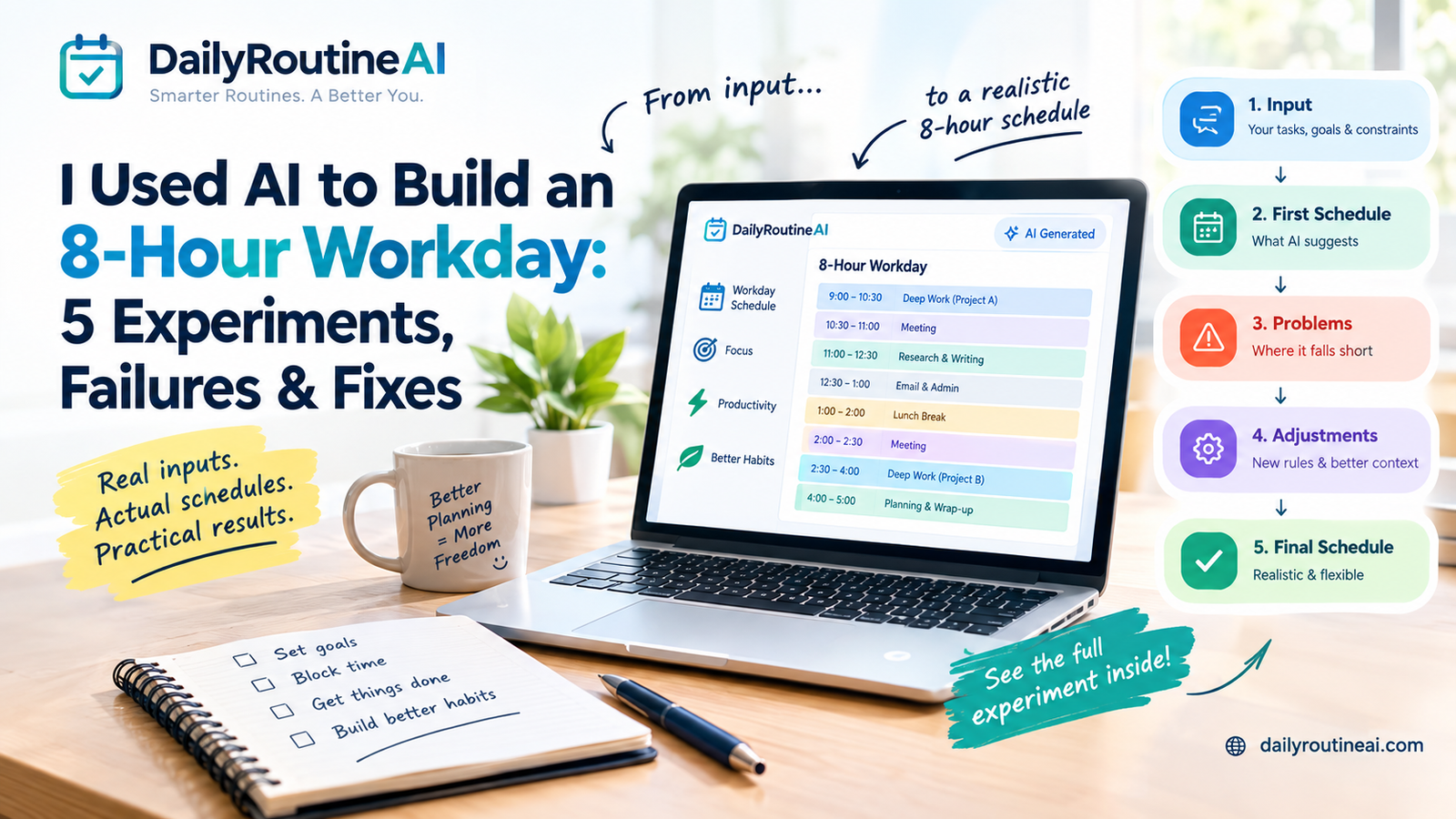
An AI can create an eight-hour workday schedule in seconds.
That doesn’t mean the schedule is realistic.
Give an AI a list of tasks and ask it to “make me productive,” and it will usually produce something that looks impressive: focused work in the morning, meetings placed neatly around it, administrative work later in the day, and perhaps a few breaks.
The problem starts when real life enters the schedule.
A meeting runs late.
A task takes twice as long as expected.
An urgent request arrives.
Your energy drops after lunch.
The carefully organized timetable suddenly stops making sense.
That is the problem I wanted to test.
Instead of asking whether AI can generate a schedule, I wanted to examine a harder question:
Can AI create an 8-hour workday that remains usable when the day stops going according to plan?
I ran the planning process through five controlled workday experiments:
- Build an initial 8-hour AI schedule
- Make a meeting run 30 minutes late
- Introduce three hours of unexpected work
- Compare an AI-generated schedule with a manually structured workday
- Rebuild the schedule around changing energy levels
The result wasn’t a perfect AI schedule.
In fact, the first schedule failed several of the tests.
That turned out to be the most useful part.
Quick Answer: Can AI Create a Realistic 8-Hour Workday?
Yes, but the first AI-generated schedule should be treated as a draft rather than a final timetable.
The biggest difference between a realistic schedule and an attractive-looking schedule is capacity.
An eight-hour workday does not provide eight hours of uninterrupted productive capacity.
Meetings, communication, breaks, transitions, unexpected work, and recovery all compete for the same limited time.
The most useful AI scheduling process therefore looks like this:
Real constraints → AI draft → stress test → identify failures → adjust rules → final schedule
That is very different from:
Task list → AI → perfect timetable
Why I Ran This AI Workday Experiment
AI daily planners and AI scheduling tools increasingly position themselves around the idea of turning tasks, priorities, calendar constraints, and available time into realistic schedules.
Current AI planning products commonly emphasize time blocking, calendar constraints, priorities, and adapting schedules when circumstances change.
There are also recent first-person experiments where people handed AI substantial control over their workdays or weeks. One five-day experiment reported using AI for scheduling, meeting preparation, and real-time adjustments, while another 30-day experiment examined AI planning across an entire month.
But there is an important gap between generating a schedule and testing whether the schedule survives disruption.
That’s what these experiments focus on.
Experiment Setup: The 8-Hour Workday Schedule
To make the tests consistent, I used a standard 9:00 AM–5:00 PM workday.
That gives us:
8 clock hours
minus
1 hour for lunch
for approximately:
7 hours of working capacity before considering breaks, transitions, and unexpected events.
The test workday contains both fixed and flexible work.
Baseline Workday
| Variable | Test condition |
|---|---|
| Working hours | 9:00 AM–5:00 PM |
| Total clock time | 8 hours |
| Lunch | 1 hour |
| Fixed meeting #1 | 10:30–11:00 AM |
| Fixed meeting #2 | 2:00–2:30 PM |
| Priority deep work | 2 blocks |
| Research/writing | 1 block |
| Administration | 1 block |
| Email/communication | 1 block |
| Breaks | Included |
| Buffer | Tested |
| Unexpected work | Added in later experiments |
The important distinction is that not every minute is assumed to be available for focused work.
What I Gave the AI
The first test used a realistic planning input rather than simply asking:
“Create a productive schedule.”
The AI was told about:
- working hours
- fixed meetings
- important tasks
- task priorities
- estimated durations
- lunch
- breaks
- deep-work requirements
- administrative work
- communication
- the need to finish the day by 5 PM
This distinction matters.
AI scheduling quality depends heavily on the information supplied to the system. Current AI planner guidance similarly emphasizes providing tasks, priorities, available time, and existing commitments rather than expecting the system to infer everything.
The First AI Scheduling Prompt
Here is the baseline prompt used for the experiment:
Create a realistic 9 AM–5 PM workday from the information below.
Working hours: 9 AM–5 PM.
Fixed commitments:
- Meeting: 10:30–11:00 AM
- Meeting: 2:00–2:30 PM
- Lunch: 1:00–2:00 PM
Priorities:
- Priority 1: Deep work on the most important project
- Priority 2: Research and writing
- Priority 3: Administrative and communication tasks
Create time blocks for each task.
Do not schedule work during meetings or lunch.
Include breaks and reasonable transitions.
Do not assume that every available minute can be used productively.
Protect the highest-priority work first.
If everything cannot fit, identify what should be moved rather than creating an unrealistic schedule.
That final instruction is important.
Instead of forcing AI to fit everything, it gives the model permission to say:
“This doesn’t fit.”
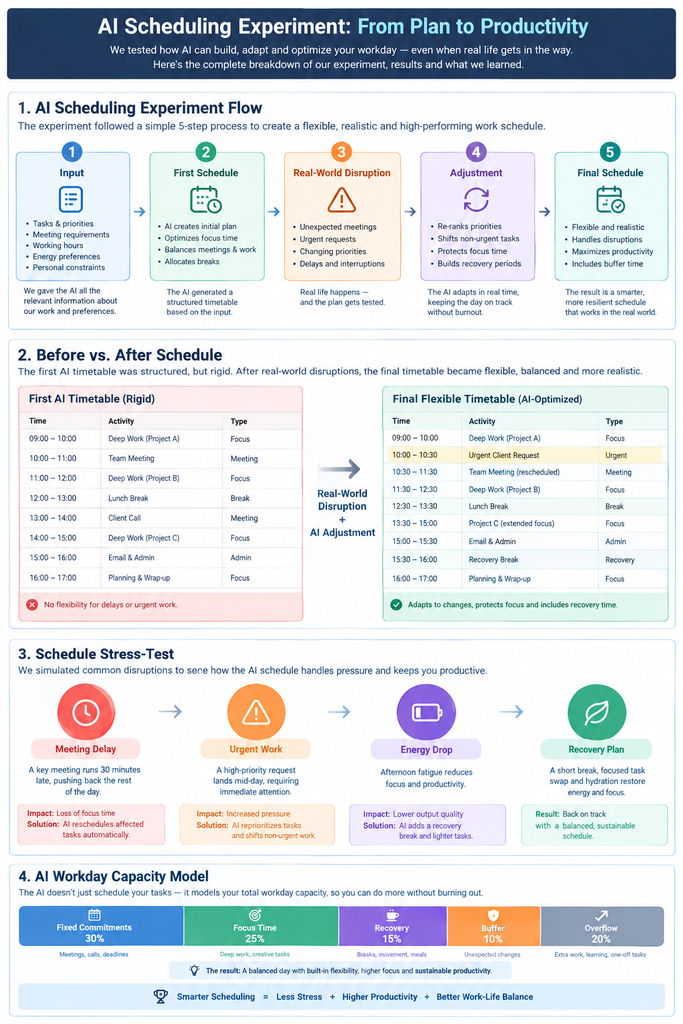
Experiment 1: The First AI-Generated Workday
The first schedule looked reasonable.
AI-generated schedule
| Time | Activity | Type |
|---|---|---|
| 9:00–10:30 | Priority deep work | Focus |
| 10:30–11:00 | Meeting | Fixed |
| 11:00–12:30 | Research + writing | Focus |
| 12:30–1:00 | Email + admin | Admin |
| 1:00–2:00 | Lunch | Recovery |
| 2:00–2:30 | Meeting | Fixed |
| 2:30–4:00 | Priority project | Focus |
| 4:00–5:00 | Communication + administration | Admin |
At first glance, this looks good.
There are two meetings.
Lunch is protected.
Important work receives large blocks.
Administrative work is pushed toward the afternoon.
But there is a problem.
There is almost no recovery capacity.
If something goes wrong, the schedule has nowhere to absorb it.
What the First Schedule Got Right
The first version did several things correctly.
1. It protected high-priority work
The most important task received large uninterrupted blocks instead of being scattered into tiny pieces.
2. It respected fixed commitments
The meetings were treated as immovable.
3. It separated focus work from administration
Research and writing were not mixed continuously with email.
4. It protected lunch
The schedule didn’t treat lunch as another productivity opportunity.
5. It created a clear sequence
Instead of beginning the day with an unstructured task list, the schedule answered:
What should happen next?
That’s one of the fundamental benefits of AI-assisted scheduling.
What the First Schedule Got Wrong
This is where the experiment became more interesting.
Problem 1: There was almost no buffer
The schedule assumed that the previous block would finish exactly when expected.
That is rarely how knowledge work behaves.
A research task can take longer.
A meeting can generate follow-up work.
An email can turn into a 20-minute problem.
A technical issue can consume an hour.
A schedule with no spare capacity has no mechanism for absorbing those events.
Problem 2: It confused available time with usable time
The calendar showed eight hours.
That doesn’t mean eight hours were available for uninterrupted work.
The real calculation is closer to:
Clock time − fixed commitments − meals − breaks − transitions − unexpected work = usable capacity
This is one of the biggest differences between a calendar and a realistic workday.
Problem 3: The schedule assumed accurate estimates
The AI could only work with the task durations it was given.
If the estimated duration is wrong, the schedule inherits the error.
Current AI scheduling guidance also recognizes this problem. Morgen, for example, recommends increasing task estimates because people commonly underestimate how long work will take.
Experiment 2: What Happens When a Meeting Runs 30 Minutes Late?
Now I introduced one simple disruption:
The 2:00 PM meeting runs until 3:00 PM instead of 2:30 PM.
Nothing else changes.
The original afternoon looked like this:
2:00–2:30 meeting
↓
2:30–4:00 priority work
↓
4:00–5:00 administration
But the meeting now occupies:
2:00–3:00
The original schedule immediately loses 30 minutes.
The Naive Response
A rigid schedule would simply push everything forward:
3:00–4:30 priority work
4:30–5:30 administration
But the workday ends at 5 PM.
Now the schedule is impossible.
The Better AI Response
Instead of moving every task, the AI should ask:
What is essential?
The revised schedule becomes:
| Time | Revised activity |
|---|---|
| 2:00–3:00 | Extended meeting |
| 3:00–3:15 | Meeting notes + reset |
| 3:15–4:15 | Priority work |
| 4:15–4:30 | Break |
| 4:30–5:00 | Essential admin/shutdown |
The lower-priority work is moved.
That is the key lesson.
A realistic AI schedule needs a priority hierarchy.
When time disappears, not everything should be compressed equally.
Experiment 3: What If Three Hours of Unexpected Work Appears?
This is the harder test.
Imagine that an urgent client/project problem appears at 11:30 AM and consumes three hours.
The original schedule can no longer survive.
A bad planning system tries to preserve the entire original plan.
That would create something like:
Urgent work + original deep work + research + admin + meetings
inside the same eight-hour day.
That’s impossible.
The Correct Response: Rebuild Instead of Compressing
The AI needs to recognize that three hours have disappeared.
The revised principle becomes:
Protect the fixed commitments and highest-priority work. Move or remove everything else.
The revised day might look like:
| Time | Activity | Status |
|---|---|---|
| 9:00–10:30 | Priority deep work | Keep |
| 10:30–11:00 | Meeting | Fixed |
| 11:00–11:30 | Research/writing | Reduced |
| 11:30–1:00 | Urgent work | Added |
| 1:00–2:00 | Lunch | Protect |
| 2:00–2:30 | Meeting | Fixed |
| 2:30–4:00 | Urgent work | Continue |
| 4:00–4:15 | Break | Protect |
| 4:15–5:00 | Highest-priority remaining task | Keep |
What disappeared?
Low-priority administrative work.
That isn’t failure.
That’s schedule triage.
A realistic planner should be capable of saying:
“You cannot complete everything today.”
That is much more useful than generating a beautiful but impossible timetable.
Experiment 4: AI Schedule vs. Manual Schedule
The next test asks a different question:
Does AI actually improve the structure of a workday compared with simply planning it manually?
Rather than claiming that AI automatically produces higher productivity, I compared the planning process itself.
Manual planning
A person typically needs to:
- list tasks
- identify priorities
- check meetings
- estimate durations
- find available blocks
- move tasks around
- protect breaks
- adjust conflicts
AI-assisted planning
The AI can help with:
- organizing the task list
- identifying conflicts
- proposing time blocks
- ordering priorities
- generating alternative schedules
- rebuilding the plan after changes
| Planning requirement | Manual planning | AI-assisted planning |
|---|---|---|
| List tasks | Manual | Manual/input |
| Identify priorities | Human | AI can assist |
| Check fixed commitments | Manual | AI can incorporate supplied constraints |
| Estimate duration | Human judgment | AI can suggest, but needs verification |
| Create blocks | Manual | AI-generated |
| Handle disruption | Manual | AI can regenerate |
| Understand personal reality | Human | Requires context |
| Final decision | Human | Human |
The important conclusion is not that AI replaces manual planning.
It’s that AI can reduce the mechanical work involved in rearranging the plan.
That distinction matters.
The Biggest Weakness of AI Scheduling
AI can manipulate time blocks extremely well.
It cannot automatically know how your real day will behave.
It doesn’t inherently know that:
- the “30-minute task” always takes 50 minutes
- your afternoon energy drops
- a particular client frequently sends urgent revisions
- research expands when you find something interesting
- you need ten minutes to transition between demanding tasks
- your meetings frequently generate follow-up work
Unless you tell it.
That’s why the human feedback loop remains essential.
Experiment 5: What Happens When Energy Changes?
Time isn’t the only constraint.
Two hours at 9 AM may not feel identical to two hours at 4 PM.
For this experiment, the workday is divided into three broad capacity zones:
High-focus period
9:00 AM–12:30 PM
Best suited to:
- research
- writing
- problem solving
- strategy
- difficult technical work
Medium-focus period
2:30–4:00 PM
Suitable for:
- structured production
- editing
- project work
- moderate concentration
Lower-focus period
4:00–5:00 PM
Better suited to:
- administration
- documentation
- planning
- follow-up
This does not mean everyone’s energy follows the same pattern.
That’s why the experiment uses energy as a planning input rather than a universal rule.
Energy-Aware Schedule
A revised workday could therefore look like:
| Time | Work type | Reason |
|---|---|---|
| 9:00–10:30 | Deep work | Protect high-focus period |
| 10:30–11:00 | Meeting | Fixed |
| 11:00–11:15 | Buffer | Recovery |
| 11:15–12:30 | Research/writing | High-focus work |
| 12:30–1:00 | Admin | Lower cognitive demand |
| 1:00–2:00 | Lunch | Recovery |
| 2:00–2:30 | Meeting | Fixed |
| 2:30–2:45 | Follow-up/buffer | Transition |
| 2:45–3:45 | Focused production | Medium-focus work |
| 3:45–4:00 | Break | Recovery |
| 4:00–4:30 | Email/admin | Lower-focus work |
| 4:30–4:45 | Flexible work | Overflow |
| 4:45–5:00 | Shutdown | Review + tomorrow |
This is more flexible than simply telling AI:
“Fill my day from 9 to 5.”
The Final AI Workday
After the five tests, the schedule needs to follow several rules:
Fixed commitments first.
Highest-value work second.
Flexible work third.
Buffer before the day becomes overloaded.
Low-priority tasks are the first candidates to move.
The resulting schedule is:
| Time | Final schedule | Category |
|---|---|---|
| 9:00–10:30 | Priority deep work | Focus |
| 10:30–11:00 | Meeting | Fixed |
| 11:00–11:15 | Buffer + notes | Flexible |
| 11:15–12:30 | Research/writing | Focus |
| 12:30–1:00 | Email/admin | Admin |
| 1:00–2:00 | Lunch/recovery | Recovery |
| 2:00–2:30 | Meeting | Fixed |
| 2:30–2:45 | Follow-up/buffer | Flexible |
| 2:45–3:45 | Focused production | Focus |
| 3:45–4:00 | Break | Recovery |
| 4:00–4:30 | Communication/admin | Admin |
| 4:30–4:45 | Overflow block | Flexible |
| 4:45–5:00 | Shutdown + next-day review | Planning |
Notice something important.
The schedule intentionally leaves flexible capacity.
That space is not wasted.
It is what prevents one unexpected event from destroying the entire plan.
Before vs. After: What Changed?
| Planning characteristic | First AI schedule | Final schedule |
|---|---|---|
| Fixed meetings | Protected | Protected |
| Deep work | Protected | Protected |
| Lunch | Protected | Protected |
| Buffer | Minimal | Explicit |
| Unexpected work | Difficult to absorb | Overflow capacity |
| Low-priority work | Assumed to fit | Movable |
| Energy | Partially considered | Used as planning input |
| End-of-day review | Limited | Protected |
| Schedule flexibility | Low | Higher |
| Main philosophy | Fill available time | Protect capacity |
The biggest change wasn’t a cleverer prompt.
It was changing the definition of a successful schedule.
The AI Prompt I Would Use After the Experiments
Here is the improved prompt:
Build a realistic workday from the information below.
My working hours are 9:00 AM–5:00 PM.
First identify my fixed commitments.
Then identify my highest-priority work, flexible work and low-priority work.
Do not assume that every minute is usable for focused work.
Protect lunch, breaks, transitions and reasonable buffer time.
Schedule difficult cognitive work during my stated high-focus periods when possible.
Do not schedule more work than can realistically fit.
If the workload exceeds available capacity, tell me what should move rather than compressing every task.
Keep at least one flexible/overflow block available.
If a meeting or urgent task changes the schedule, rebuild the remaining day rather than simply pushing every task later.
When something must be removed, preserve the highest-priority work first.
At the end, provide:
- The schedule
- What is fixed
- What can move
- The buffer available
- The first task to remove if the day becomes overloaded
- A fallback schedule if a major interruption occurs
This is a much more useful AI scheduling prompt than:
“Make me a productive schedule.”
The 5 Rules That Made the Biggest Difference
Rule 1: Don’t fill every minute
A full calendar has no room for reality.
Rule 2: Separate fixed and flexible work
Fixed commitments determine the skeleton.
Flexible work fills the remaining space.
Rule 3: Protect priorities, not individual time blocks
If a meeting runs late, the objective shouldn’t be:
“Protect the 2:30 block.”
It should be:
“Protect the most important outcome.”
That’s a major difference.
Rule 4: Use overflow capacity
An overflow block gives unfinished work somewhere to go without automatically destroying the entire afternoon.
Rule 5: Let AI revise the plan
The first schedule is only version one.
The useful workflow is:
Plan → execute → observe → adjust → replan
The 5-Minute AI Schedule Stress Test
Before accepting an AI-generated schedule, ask five questions.
Test 1: What if my biggest task takes twice as long?
Can the schedule recover?
Test 2: What if a meeting runs 30 minutes late?
Which task moves?
Test 3: What if three hours disappear?
Does the AI know what to remove?
Test 4: What if my energy drops?
Can demanding work move to another block?
Test 5: What if an urgent task appears?
Does the schedule have capacity?
If the answer to all five is “everything simply gets pushed later,” the schedule isn’t flexible enough.
AI Schedule vs. Rigid Time Blocking
This experiment also highlights a problem with rigid time blocking.
Traditional time blocking can be useful because it converts vague intentions into specific periods of work.
But when the day changes, a rigid plan can become difficult to maintain.
DailyRoutineAI’s existing work on flexible time blocking makes the same distinction: changing schedules need fixed commitments, flexible work windows, recovery time, and priorities rather than increasingly rigid blocks.
| Rigid approach | Flexible AI approach |
|---|---|
| Every task has one exact slot | Tasks can move within rules |
| Late meeting breaks schedule | Lower-priority work moves |
| All tasks treated equally | Priorities determine what survives |
| No spare capacity | Buffer is intentional |
| Plan is fixed | Plan can be regenerated |
| Success = following timetable | Success = protecting priorities |
What AI Can Do Well
AI is particularly useful for the mechanical side of scheduling.
It can help:
- organize a task list
- identify scheduling conflicts
- propose time blocks
- separate tasks by priority
- generate alternative schedules
- reorganize flexible work
- create fallback plans
- turn planning rules into a repeatable process
Modern AI planner products increasingly describe this type of workflow: tasks and constraints go in, AI proposes a time-based plan, and the user adjusts or follows the result.
What AI Cannot Know Automatically?
AI does not automatically know your actual capacity.
It needs information about:
- realistic task durations
- energy patterns
- interruptions
- personal commitments
- transition time
- recurring problems
- priorities
- what can safely move
- what absolutely cannot move
That’s why the quality of the output depends partly on the quality of the input.
Does AI Actually Make You More Productive?
This experiment does not prove that an AI-generated schedule automatically makes someone more productive.
That would require a different experiment with actual behavioral measurements across multiple days.
For example:
| Metric | What to measure |
|---|---|
| Planned tasks | Number scheduled |
| Completed tasks | Number completed |
| Completion rate | Completed ÷ planned |
| Planning time | Minutes spent planning |
| Schedule changes | Number of changes |
| Overrun | Planned vs. actual duration |
| Deep-work time | Actual focused minutes |
| Unplanned work | Minutes consumed |
| Carryover | Tasks moved to next day |
This is an important distinction.
A better-looking schedule is not the same thing as better productivity.
How I Would Measure a Real AI Workday Experiment
If you want to turn this into a genuine first-party case study rather than a controlled planning test, track the same metrics for several days.
Planned vs. actual
| Task | Planned | Actual | Difference |
|---|---|---|---|
| Deep work | 90 min | Record actual | — |
| Research | 75 min | Record actual | — |
| Admin | 30 min | Record actual | — |
| Meeting | 30 min | Record actual | — |
Then calculate:
Schedule accuracy = actual duration ÷ planned duration
For example, if a task was planned for 60 minutes and required 90:
90 ÷ 60 = 1.5
The task took 50% longer than planned.
That information can then become an input for tomorrow’s AI schedule.
The Feedback Loop
This is where AI scheduling becomes considerably more interesting.
Instead of:
AI → schedule
use:
AI → schedule → real day → actual duration → failure points → new constraints → revised schedule
For example:
Monday
AI estimates writing = 60 minutes.
Actual = 90 minutes.
↓
Tuesday
Tell AI:
“My writing tasks consistently take about 50% longer than the initial estimate.”
↓
AI increases the planning allowance.
That creates a system that learns from your observations, rather than pretending it already knows your capacity.
Where an AI Daily Planner Fits
A general-purpose AI chatbot can generate a schedule from a prompt.
An AI daily planner can go further depending on the product: it may combine tasks, priorities, routines, available time, and calendar information into a repeatable planning workflow. Current AI planner products describe variations of this model.
The distinction is useful:
| Tool | Primary job |
|---|---|
| To-do list | Store tasks |
| Calendar | Store commitments |
| Time blocking | Assign work to periods |
| AI chatbot | Generate/revise plans from instructions |
| AI daily planner | Organize planning into a repeatable workflow |
No single approach is automatically right for everyone.
The useful question is:
What planning problem are you actually trying to solve?
How DailyRoutineAI’s Routine Architect Fits Into This Experiment
This experiment also explains why the input stage matters so much.
DailyRoutineAI’s Routine Architect is designed around the idea of starting with the person’s goals and lifestyle rather than simply opening an empty timetable. Its current AI Daily Planner content describes the process as using information about the user’s goals and lifestyle to create a tailored daily schedule.

That is relevant to this experiment because the strongest schedules weren’t created by asking:
“Make me productive.”
They were created by providing context:
constraints + priorities + available time + realistic capacity + flexibility
The same principle also matters when schedules are irregular. DailyRoutineAI’s recent work on irregular hours and shift workers emphasizes building around actual working hours and fixed commitments instead of forcing everyone into a standard 9-to-5 template.
Who Should Try AI Workday Scheduling?
AI scheduling can be particularly useful for people who regularly deal with multiple competing commitments.
Freelancers
Client work, revisions, communication, and administration can compete for the same hours.
Remote workers
Meetings can fragment otherwise usable focus time.
Founders
Strategic work competes with communication and urgent decisions.
Students
Classes, assignments, study, and personal responsibilities need to fit together.
Knowledge workers
Research, writing, and problem-solving often have unpredictable durations.
People with changing schedules
A static routine becomes less useful when working hours change frequently.
The important point is that AI should support the person’s actual constraints, not force those constraints into a generic productivity template.
Common Mistakes When Asking AI to Plan Your Workday
Mistake 1: Asking AI to “make me productive”
That’s too vague.
Give it constraints.
Mistake 2: Giving AI only a task list
A task list doesn’t tell AI:
- when you work
- what cannot move
- what matters most
- how long things take
- when your energy changes
Mistake 3: Scheduling 100% of available time
This creates fragile schedules.
Mistake 4: Treating AI estimates as facts
AI estimates are suggestions.
Your experience should override them.
Mistake 5: Keeping low-priority tasks when the day becomes overloaded
When three hours disappear, something needs to move.
Mistake 6: Never updating the planning rules
If the same task takes 90 minutes every time AI schedules it for 45, the planning system needs new information.
The Final Framework: How to Use AI to Plan a Realistic Workday
Use this 10-step process.
Step 1: Define your working hours
Example:
9 AM–5 PM
Step 2: Add fixed commitments
Meetings, appointments, and deadlines.
Step 3: Separate flexible tasks
These are the tasks that can move.
Step 4: Identify your highest-priority work
Choose what must survive if the day becomes difficult.
Step 5: Estimate realistic durations
Don’t use optimistic estimates simply because you want the task to fit.
Step 6: Tell AI about your energy
Identify when demanding work is easiest or hardest.
Step 7: Generate the first schedule
Treat it as a draft.
Step 8: Stress-test the schedule
Test delays, interruptions, and unexpected work.
Step 9: Create a fallback plan
Tell AI what should move first.
Step 10: Compare the plan with reality
Use actual duration and completed work to improve tomorrow’s schedule.
A Reusable AI Workday Planning Template
Copy this prompt into your AI assistant:
Plan my workday using a realistic capacity-first approach.
Working hours: [START–END]
Fixed commitments:
[LIST]High-priority tasks:
[LIST]Medium-priority tasks:
[LIST]Low-priority tasks:
[LIST]Estimated task durations:
[LIST]My highest-energy period:
[TIME]My lower-energy period:
[TIME]Required breaks:
[DETAILS]Lunch:
[TIME]Create a time-blocked schedule, but do not fill every available minute.
Protect fixed commitments first.
Protect the highest-priority work second.
Leave buffer and overflow capacity.
If everything cannot fit, tell me what should move instead of pretending it can all be completed.
Then create:
- The primary schedule
- A fallback schedule if one major task takes twice as long
- A fallback schedule if a meeting runs 30 minutes late
- A plan for handling an unexpected urgent task
- A short end-of-day review checklist
Final Verdict From the Experiment
The biggest lesson wasn’t:
“AI can plan an eight-hour workday.”
We already know AI can generate a timetable.
The more useful finding is:
AI becomes more useful as a workday planning assistant when it is given real constraints, allowed to leave capacity unused, and required to explain what should move when the day changes.
The first schedule looked productive.
The revised schedule was designed to be recoverable.
That’s an important distinction.
A perfect schedule assumes nothing goes wrong.
A realistic schedule assumes something will.
The 8-Hour Workday Doesn’t Need to Be Full.
An eight-hour workday doesn’t need eight hours of tightly scheduled tasks.
A stronger planning model is:
Fixed commitments
priority work
realistic breaks
buffer
overflow capacity
flexible work
=
a schedule that can survive reality
That’s the real value of using AI for workday planning.
- Not giving AI complete control.
- Not filling every empty calendar slot.
- Not producing the most impressive timetable.
Use AI to build the first version. Use reality to improve the next one.
Frequently Asked Questions
Can AI create an 8-hour workday schedule?
Yes. AI can turn working hours, tasks, priorities, and fixed commitments into a proposed time-blocked schedule. The schedule should be reviewed for realistic durations, breaks, transitions, and unexpected work.
What is the best AI prompt for planning a workday?
The strongest prompts provide working hours, fixed commitments, task priorities, estimated durations, energy constraints, and instructions to leave buffer time. They should also tell AI what to move when the workload exceeds available capacity.
Should AI schedule every minute of my workday?
No. A full schedule leaves no capacity for delays, interruptions, transitions, or unexpected work. A realistic plan should contain some flexible capacity.
Can AI adjust a schedule when a meeting runs late?
AI can generate a revised schedule when you provide the new constraint. The important part is telling it which tasks are fixed, which are flexible, and which priorities must survive.
What should I do when an AI schedule has too many tasks?
Ask AI to rank the tasks and identify what should be postponed. Don’t simply ask it to compress the existing schedule.
Is AI better than traditional time blocking?
They solve related problems differently. Traditional time blocking gives you direct control over when work happens. AI can reduce the manual effort of creating and rebuilding those blocks. The best approach depends on the user’s planning needs.
Can AI know how long my work will take?
Not reliably without your feedback. AI can estimate durations, but actual task duration varies by person, task complexity, interruptions, and context.
Can AI plan a flexible workday?
Yes. Flexibility should be built into the planning rules. Fixed commitments can remain anchored while flexible tasks move around them.
Does an AI-generated schedule guarantee higher productivity?
No. A generated schedule is a planning output, not proof of improved productivity. Measuring actual completion, planning time, interruptions, and planned-versus-actual duration is necessary to evaluate productivity effects.