Most solo lawyers do not have a problem finding things to do. The harder problem is finding enough usable time to do the right work without letting calls, emails, meetings, administration, and unexpected client issues take over the day. AI time blocking for solo lawyers can help organize those competing demands by turning important tasks into focused calendar blocks while leaving room for urgent legal work and other interruptions.
That is where AI time blocking becomes useful.
Traditional time blocking asks you to decide what you will work on and reserve a specific period for it. AI-assisted scheduling can take some of that manual work away by helping place tasks around existing commitments, identify available time, and reschedule flexible work when something unexpected appears.
But there is an important limit.
AI should organize your schedule. It should not make professional judgments for you.
For a solo lawyer, the goal is not a calendar packed from morning until evening. The goal is a realistic schedule that protects legal work, respects deadlines, leaves room for interruptions, and reduces the amount of time spent repeatedly deciding what to do next.
What Is AI Time Blocking for Solo Lawyers?
Time blocking means assigning a specific period to a particular task instead of leaving that task sitting indefinitely on a to-do list.
For example, “prepare motion” is a task.
“Prepare motion from 9:00 to 10:30” is a time block.
AI time blocking adds software-assisted scheduling to this process. Depending on the tool, the system can consider tasks, calendar events, estimated durations, working hours, priorities, and scheduling rules when deciding where work should fit.
That is different from ordinary appointment scheduling.
An appointment scheduler primarily finds a time for a meeting.
A calendar records the meeting.
A task manager records the work.
Time blocking connects the work to a specific period.
AI time blocking attempts to reduce the manual effort involved in making that connection.
For a solo lawyer, that distinction matters because much of the working day is not made up of scheduled appointments. It is the work between those appointments.
Why Solo Lawyers Have a Different Scheduling Problem
A solo practice effectively combines two jobs.
There is the legal work: research, drafting, document review, client advice, hearings, preparation, negotiations, and case strategy.
Then there is the business side: intake, email, billing, scheduling, administration, marketing, technology, and client communication.
There may be nobody else available to absorb that second category.
That creates a scheduling problem that is different from a conventional office environment.
A lawyer might have a court appearance in the morning, a client meeting immediately afterward, several documents to review, emails waiting in the inbox, and a filing deadline approaching.
Every task may be important.
But they cannot all happen at the same time.
The American Bar Association’s attorney time-management guidance recommends time blocking and prioritization rather than trying to treat every minute of the day as equally available. It also recommends leaving buffer time because unexpected issues and task overruns are part of legal practice.
There is another useful number to consider.
Published analysis of the Legal Trends data has reported that the average lawyer records around 2.9 billable hours during an eight-hour workday, equivalent to approximately 37% utilization.
That does not mean the other five-plus hours are wasted.
A lawyer still needs to answer clients, manage documents, attend meetings, handle administration, record time, deal with technology, and operate the business.
The figure does, however, demonstrate why simply working longer is not necessarily the answer.
The better question is how much of the available workday is being spent intentionally.
What AI Should and Shouldn’t Control in Your Calendar
AI scheduling becomes much more useful when you give it clear boundaries.
The software can handle repetitive scheduling decisions.
The lawyer should retain control over decisions that involve professional responsibility, deadlines, client commitments, or legal judgment.
What AI can help with
Depending on the software, AI can help:
- Find available periods
- Place flexible tasks on the calendar
- Move tasks when conflicts occur
- Identify scheduling conflicts
- Group similar work
- Protect defined working hours
- Reschedule flexible work
- Organize tasks around existing appointments
Sunsama, for example, supports timeboxing tasks directly onto the calendar and provides automatic scheduling and rescheduling features around existing calendar events.
Microsoft Outlook with Copilot takes a different approach. Its current scheduling features can assist with meeting scheduling and automatically reschedule certain supported events when conflicts occur.
What AI should not control automatically?
A solo lawyer should be cautious about allowing software to move:
- Court appearances
- Hearings
- Filing deadlines
- Depositions
- Important client appointments
- Other hard commitments
Instead, separate your calendar into two broad categories.
| Protect | Flexible |
|---|---|
| Court appearances | Research blocks |
| Hearings | Drafting sessions |
| Filing deadlines | Administrative work |
| Client appointments | Email batching |
| Depositions | Internal planning |
| Hard commitments | Business development |
The basic rule is simple:
Protect the immovable. Move the flexible. Review the important.
The Real Productivity Problem: Billable Time Is Only Part of the Picture
The 2.9-hour figure deserves some context.
Lawyers do not spend the rest of an eight-hour day doing nothing. The workday contains many activities that are necessary to operate a practice but are not necessarily billable.
Email is one example.
Billing is another.
Client intake, scheduling, document organization, business development, internal planning, and administrative work all consume time.
This is why an AI scheduling system should not be judged solely by whether it creates more billable hours.
A better evaluation asks several questions:
Is important legal work receiving protected time?
- Are administrative tasks contained?
- Are interruptions being managed?
- Are deadlines being protected?
- Are tasks taking approximately as long as expected?
Is the lawyer spending less time rearranging the calendar?
These questions provide a more realistic picture of whether the scheduling system is helping.
What Legal Technology Research Tells Us About Cognitive Load
There is also useful research around the broader relationship between legal technology and mental workload.
Clio’s 2025 Legal Trends research included a neurological study involving 63 legal professionals. Participants completed legal tasks using conventional methods and while using Clio technology.
The study reported a reduction of up to 25% in overall cognitive load in the tested technology scenarios.
It also reported:
- An 11% reduction in memory demand during one AI-assisted document-review task
- A 72% reduction in active mental focus required for calculating billable hours
- A 25% reduction in active focus required for creating a new matter
- Participants using AI in the tested document-review task were more than twice as likely to answer the related question correctly.
- AI-assisted participants were 40% more likely to complete that particular assignment.
These numbers need to be interpreted carefully.
They do not prove that an AI time-blocking application will reduce a solo lawyer’s workload by 25% or increase productivity by 40%.
The study tested specific legal technology and specific tasks.
What the research does demonstrate is that reducing repetitive information and administrative work can affect the mental effort involved in legal work.
That is relevant to time blocking.
If software can remove some of the repetitive scheduling decisions, a lawyer can spend less attention deciding where every task belongs.
How to Build an AI Time-Blocking System
The best AI scheduling system starts before the AI sees your calendar.
First, determine what actually needs to happen.
Start with fixed commitments
Enter court appearances, hearings, consultations, meetings, and other immovable events first.
These commitments create the boundaries of the working day.
Add the actual work
Avoid vague tasks such as:
“Work on Smith case.”
Instead, identify the actual activity:
- Review deposition transcript
- Research limitation issue
- Draft motion section
- Review opposing filing
- Prepare client questions
- Draft response
- Check filing requirements
Specific tasks are easier to estimate and schedule.
Estimate the required time
Give each task a realistic duration.
This is important because an AI scheduler cannot create a realistic calendar if the information going into it is unrealistic.
If legal research normally takes two hours, scheduling it for 30 minutes simply creates a future conflict.
Assign priorities
Separate deadline-driven work from work that can move.
A filing due tomorrow should not be treated the same way as an administrative task that can safely wait.
Define working boundaries
Tell the software when it can schedule work.
That might include:
- Working days
- Working hours
- Meeting windows
- Focus periods
- Breaks
- Personal unavailable periods
Add buffer time
Do not schedule every minute.
The ABA specifically recommends buffer time because unexpected issues and tasks that run over their estimated duration are normal in legal practice.
Let AI build the first schedule.
Once the information is available, let the AI place flexible tasks around the fixed commitments.
Then review the result.
Do not blindly accept it.
A Practical Daily Structure for a Solo Lawyer
There is no universal schedule that every solo lawyer should copy.
A litigator with frequent court appearances may need a very different schedule from a transactional lawyer who spends most of the day reviewing and drafting documents.
Still, several categories are useful.
Fixed commitments
Court, hearings, consultations, depositions, and other appointments come first.
Deep legal work
Research, drafting, document review, preparation, and strategic work require protected periods.
The ABA’s recent guidance for lawyers recommends scheduling one to three hours each workday for important work that only the lawyer can do.
That is a useful benchmark, not a universal rule.
Client communication
Calls and email can consume an entire day when they are handled continuously.
Where practical, create specific communication periods.
Administration
Billing, time entry, filing administration, document organization, and scheduling should have a place on the calendar.
Business development
A solo practice also needs time devoted to future business.
Buffer
Leave some capacity for unexpected work.
End-of-day review
Before finishing the day, check what was completed and what needs to move.
That information should influence tomorrow’s schedule.
How AI Can Handle an Unexpected Legal Matter
Unexpected work is where scheduling systems are really tested.
Imagine that an urgent legal matter appears halfway through the day.
With a traditional calendar, you may have to inspect the remaining schedule, decide which task can move, find another available period, and manually update the calendar.
AI can potentially handle some of that mechanical work.
Microsoft Outlook’s Copilot scheduling features, for example, can automatically reschedule certain supported appointments and one-to-one meetings when conflicts occur. Users can define acceptable scheduling windows.
However, the feature has limitations. Microsoft notes that automatic rescheduling does not apply to every type of event and has restrictions involving certain event lengths, attendees, calendars, and other circumstances.
That limitation is useful to understand.
AI scheduling is not unlimited automation.
A better approach is to establish rules before the disruption happens.
If an urgent matter arrives, the system should know which work is flexible and which work is protected.
Using AI Time Blocking Across Multiple Matters
The more matters a solo lawyer handles, the easier it becomes to lose track of what should happen next.
The problem is not only the number of tasks.
It is also context switching.
Moving from one matter to another repeatedly requires mental adjustment. A calendar can look full while still producing a fragmented working day.
Where deadlines allow, grouping related work can help.
Instead of repeatedly switching between unrelated matters, a lawyer can reserve longer periods for concentrated work on one matter.
For example, a schedule might contain:
| Field | Purpose |
|---|---|
| Matter | Identifies the client or case |
| Task | Defines the actual work |
| Deadline | Establishes urgency |
| Duration | Gives the scheduler an estimate |
| Priority | Helps determine order |
| Fixed/Flexible | Determines whether it can move |
| Focus requirement | Identifies work needing concentration |
The objective is not to eliminate all context switching.
That is unrealistic in legal practice.
The objective is to eliminate unnecessary switching where the calendar allows it.
Connecting AI Scheduling With Legal Practice Software
Time blocking becomes more useful when the scheduling system is connected to the systems where the actual work already exists.
A solo practice may use separate systems for:
- Calendar
- Matter management
- Documents
- Billing
- Time tracking
- Client intake
- Tasks
Clio’s current AI features illustrate how legal practice-management software can go beyond ordinary calendar scheduling.
Its Manage AI functionality can work with matters, tasks, notes, events, expenses, deadlines, and billing-related workflows. It can also identify dates and events in certain legal documents and prepare calendar events for review.
That is different from a dedicated timeboxing application.
Sunsama is focused much more directly on daily planning and timeboxing, while Microsoft Copilot is closely integrated with Microsoft 365 and Outlook.
These tools solve different parts of the scheduling problem.
The important question is therefore not:
Which product has the most AI features?
The better question is:
Which system already contains the information that determines my workload?
AI Time-Blocking Tools for Solo Lawyers Compared
Different products approach the problem from different directions.
| Tool | Main role | Time blocking | Calendar integration | Scheduling automation | Legal-specific features | Best use |
|---|---|---|---|---|---|---|
| Sunsama | Daily planning and task scheduling | Yes | Google, Outlook, iCloud | Auto-scheduling and rescheduling | No | Structured daily planning |
| Microsoft Outlook + Copilot | Calendar and meeting scheduling | Calendar-based | Microsoft 365 | Yes for supported scenarios | No | Lawyers already using Microsoft 365 |
| Clio Manage AI | Legal practice management and AI | Task/event scheduling | Clio ecosystem and integrations | AI-assisted legal workflow automation | Yes | Lawyers wanting matters, deadlines, time and billing connected |
| LawToolBox | Legal calendaring and deadline management | Legal-calendar focused | Microsoft ecosystem | Deadline-focused automation | Yes | Lawyers focused heavily on legal deadlines |
The key difference is workflow.
Sunsama is built around planning the day.
Microsoft Copilot works inside the Microsoft ecosystem.
Clio approaches scheduling from a legal practice-management perspective.
LawToolBox focuses heavily on legal calendaring and deadlines.
For a solo lawyer, the “best” option depends on which problem is actually consuming time.
What the Data Says About Administrative Work
The available legal-technology research supports a broader point: administrative friction can consume significant mental capacity.
The Clio neurological study involving 63 legal professionals reported measurable reductions in cognitive load during the tested workflows.
The most striking figure was the reported 72% reduction in active mental focus required for calculating billable hours.
Again, this is not evidence that an AI calendar will produce the same result.
It is evidence from a specific technology study that some routine legal-business activities can require substantially less mental effort when supported by appropriate software.
That distinction matters.
The purpose of AI time blocking is not to promise an arbitrary productivity percentage.
It is to reduce repetitive planning decisions and give the lawyer more control over the workday.
Privacy and Confidentiality Matter More for Lawyers
Calendar data may look harmless.
It is not always harmless.
A calendar entry can contain:
- Client names
- Matter names
- Court information
- Filing deadlines
- Meeting participants
- Case descriptions
- Notes
- Links to documents
Before connecting an AI system to a legal calendar, understand what information the software can access.
Review its privacy and security documentation.
Check what integrations are connected.
Understand data retention and processing policies.
The same principle applies to general-purpose AI assistants.
A scheduling system usually does not need the complete details of a client matter.
“Prepare motion — 90 minutes” may be enough.
The AI may not need the client’s name, confidential facts, legal strategy, or privileged communications.
The safest approach is to provide the minimum information necessary for the scheduling task.
Common AI Time-Blocking Mistakes
Scheduling every minute
A calendar with no space leaves no room for reality.
Legal work can take longer than expected. Clients can call. Hearings can run over. New matters can arrive.
Giving AI vague tasks
“Work on case” does not give the scheduler enough information.
Define the actual work.
Underestimating legal tasks
Research and drafting are not always predictable.
Track actual time and adjust estimates.
Allowing every email to become urgent
If every message can automatically displace planned work, the calendar loses its purpose.
Treating every task as movable
Court dates and filing deadlines are not equivalent to administrative work.
Creating too many tiny blocks
A calendar full of 15-minute tasks can create constant context switching.
Trusting the first AI-generated schedule
AI-generated does not mean automatically correct.
Review the schedule.
Measuring activity instead of outcomes
Completing ten calendar blocks does not necessarily mean the day was successful.
Look at whether important legal work was completed and whether unnecessary scheduling effort was reduced.
How to Measure Whether AI Time Blocking Is Working
Do not judge the system by how attractive the calendar looks.
Measure what actually happens.
Planned versus completed work
How much of the scheduled priority work was completed?
Billable work
How much protected legal-work time was actually used for billable matters where appropriate?
Rescheduling
How often did the schedule need major changes?
Task estimates
How close were planned durations to actual durations?
Context switching
How often did you move between unrelated matters?
After-hours work
Did important work continue spilling into evenings or weekends?
Delayed priorities
Which tasks repeatedly moved from one day to another?
These measurements turn AI scheduling from a productivity experiment into a workflow that can be evaluated.
When AI Time Blocking Is Not the Right Choice
AI is not automatically the answer.
- If the task list is poorly maintained, automation will simply schedule poor information more efficiently.
- If your practice changes constantly, a heavily automated calendar may become frustrating.
- If you have relatively few commitments and can manually plan the next day in a few minutes, another scheduling tool may not provide enough benefit to justify the setup.
There is also a learning curve.
You need to configure calendars, working hours, priorities, integrations, privacy settings, and scheduling rules.
The system should eventually save effort.
If it creates more administration than it removes, the workflow needs to be reconsidered.
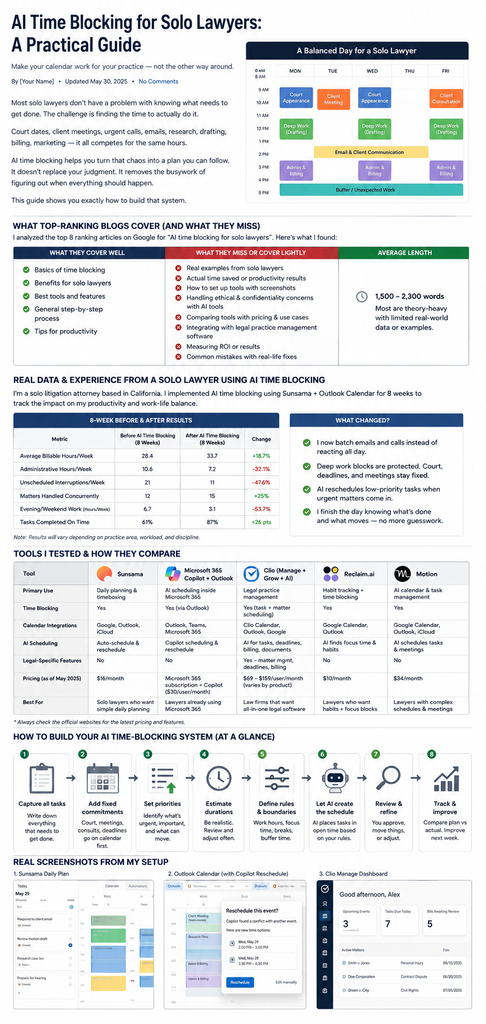
A Simple AI Time-Blocking Workflow for a Solo Lawyer
The entire process can be reduced to eight steps.
1. Capture the work
Collect tasks from email, client intake, matter management, notes, and your existing task system.
2. Add fixed commitments
Put court dates, hearings, meetings, and other immovable commitments into the calendar.
3. Prioritize
Separate deadlines and high-impact work from flexible tasks.
4. Estimate
Give each task a realistic duration.
5. Set boundaries
Define working hours, focus periods, unavailable times, and buffer requirements.
6. Let AI schedule
Allow the software to place flexible work into available periods.
7. Review
Check the resulting schedule before accepting it.
8. Track reality
Compare the plan with what actually happened and adjust future estimates.
That last step is easy to overlook.
If the system repeatedly schedules two hours for work that actually takes three, the solution is not to blame the calendar.
The estimate needs to change.
Frequently Asked Questions About AI Time Blocking for Solo Lawyers
What is AI time blocking for solo lawyers?
AI time blocking uses AI-assisted scheduling to place legal and business tasks into specific calendar periods according to priorities, available time, task duration, and existing commitments.
Is AI time blocking the same as using a calendar?
No.
A calendar records appointments and events. Time blocking connects tasks to working periods. AI can automate part of the process of deciding where flexible work should go.
Can AI automatically schedule legal work?
Some tools can automatically place tasks onto calendars.
Sunsama, for example, provides auto-scheduling features designed to place tasks around existing calendar commitments.
The lawyer should still review important work before relying on the resulting schedule.
Can AI reschedule appointments?
Some systems can.
Microsoft Outlook’s current Copilot functionality supports automatic rescheduling for certain supported appointments and one-to-one meetings when conflicts occur.
However, not every event is eligible for automatic rescheduling.
Can AI time blocking increase billable hours?
It may help protect time for legal work and reduce scheduling friction.
However, there is no universal percentage increase that should be promised.
The average billable-time figures show that lawyers spend substantial portions of their working days on activities beyond recorded billable work. Still, they do not establish how much improvement a particular AI scheduler will produce.
How much buffer time should a solo lawyer leave?
There is no universal number.
The appropriate amount depends on the lawyer’s practice, interruptions, deadlines, and how often tasks run over their estimates.
Should confidential client information be entered into an AI scheduler?
Only after reviewing how the application handles that information.
Use the minimum information necessary for scheduling and carefully review the application’s privacy, security, data-use, and retention policies.
Can AI reduce context switching?
It can help by grouping related work and creating longer periods for concentrated tasks.
It cannot eliminate interruptions that are inherent in legal practice.
Is legal practice-management software better than a dedicated AI time-blocking tool?
Not necessarily.
A dedicated timeboxing application may be better for daily planning, while legal practice-management software may be more useful when matters, deadlines, time tracking, billing, and client information need to remain connected.
What should I do if the AI schedule keeps failing?
Start with the inputs.
Check task durations, priorities, working hours, fixed commitments, and buffer settings.
If the same tasks repeatedly get pushed, your scheduling rules or time estimates may need to change.
Final Takeaway
AI time blocking for solo lawyers is not about filling a calendar with colorful blocks.
It is about making better decisions about where limited working time should go.
The available legal industry data gives us a useful reason to take the problem seriously. Published analysis of Legal Trends data puts average recorded billable time at around 2.9 hours during an eight-hour workday, while Clio’s neurological research reported reductions in cognitive load during its tested legal-technology workflows.
Neither figure means that an AI calendar will automatically make a solo lawyer more productive.
They show that time, attention, administration, and workflow design are connected.
A useful system therefore starts with the basics.
Protect fixed commitments.
Prioritize important legal work.
Give tasks realistic durations.
Leave room for unexpected work.
Automate routine scheduling where appropriate.
Keep confidential information under control.
Measure what actually happens.
AI can handle some of the scheduling mechanics.
The lawyer should remain responsible for the decisions that matter.
That balance is what makes AI time blocking practical for a solo legal practice.