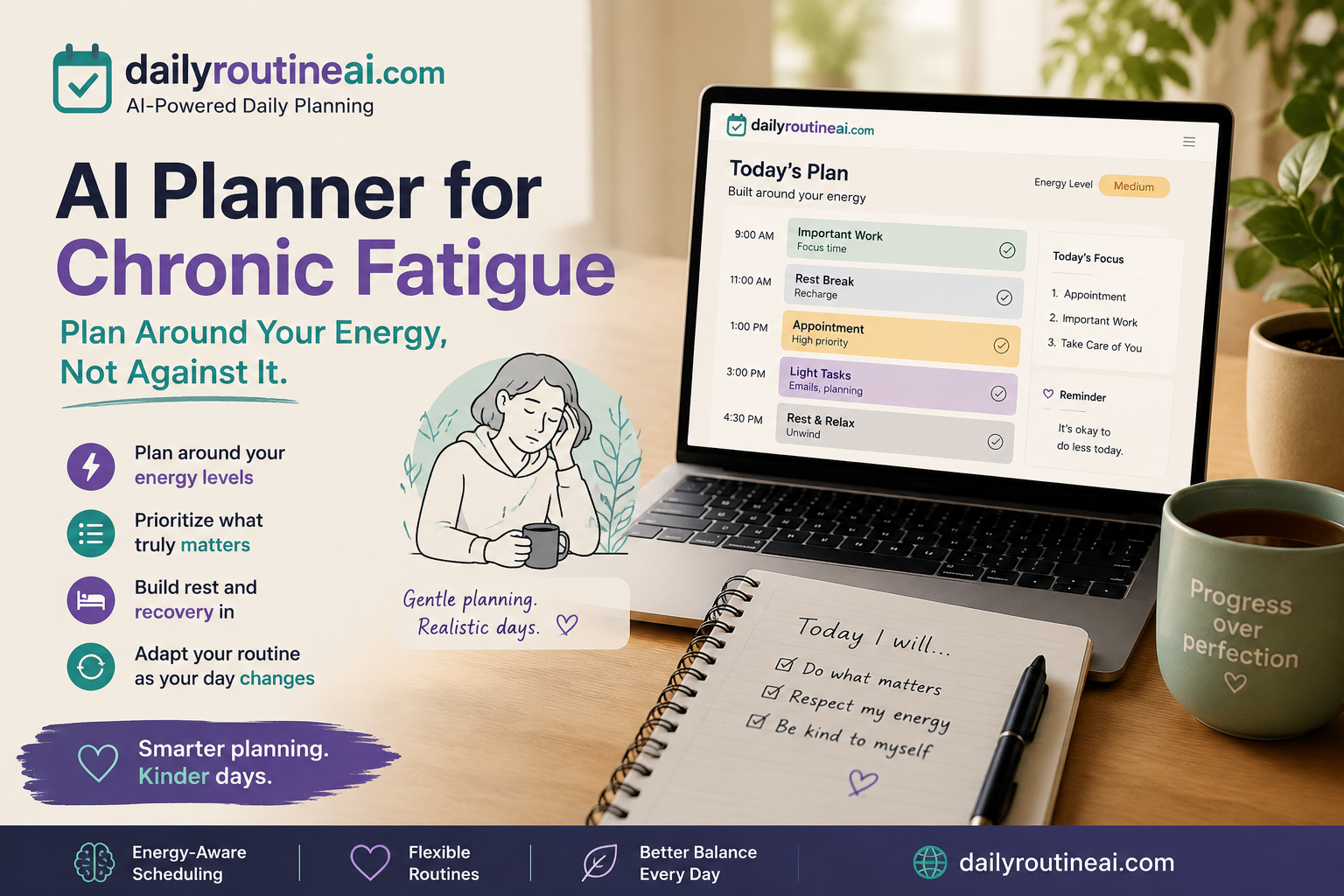
Many people assume a daily planner should help them fit as many tasks as possible into one day. That approach does not always work when fatigue affects how much you can realistically do. An AI planner for chronic fatigue can take a different approach. Instead of filling every available hour with tasks, it can help organize responsibilities around your available energy, priorities, rest, and changes throughout the day.
The goal is not to create the busiest schedule.
The goal is to create a day that is realistic enough to manage.
An AI planner cannot diagnose chronic fatigue, identify its underlying cause, or replace medical care. What it can do is make daily planning more flexible and easier to adjust when your capacity changes.
AI Planner for Chronic Fatigue: What Should It Actually Do?
A useful planner should do more than produce a long checklist.
It should help answer a simple question: What is realistic for me today?
That means looking at the tasks you need to handle, identifying what matters most, considering your available capacity, and leaving enough room to change the plan later.
For example, imagine your list includes:
- Attend an appointment
- Answer important work messages
- Prepare food
- Clean the kitchen
- Pay a bill
- Read a few pages of a book
A traditional planner might put all six activities into the day’s schedule.
A flexible AI planner could help separate the appointment and important messages from tasks that can wait. Cleaning the kitchen may not need to happen today. Reading could remain an optional activity if enough capacity is available.
That creates a more realistic plan without pretending that every task has the same priority.
The important point is that the planner should support your decision-making. It should not make medical decisions for you.
Why Traditional Daily Plans Can Be Difficult on Low-Energy Days
A fixed schedule works best when your available time and capacity are relatively predictable.
Fatigue can make that assumption difficult.
You might start the morning expecting to complete several tasks, only to discover that the first task takes more effort than expected. An appointment may take longer than planned. A simple household activity may require more physical effort. A concentration-heavy task may leave you needing additional downtime.
When that happens, a rigid schedule can quickly fall apart.
There is also a tendency to compensate on better days by trying to catch up on everything that was missed previously. That can create an uncomfortable cycle where one productive day is followed by a period when completing normal activities becomes more difficult.
A better daily plan leaves room for fluctuations.
Instead of asking, “How much can I possibly fit into today?” ask, “What can I realistically manage today while leaving room for unexpected changes?”
That small change in thinking can make the schedule much more practical.
How an AI Planner Can Build a More Flexible Daily Routine
The quality of an AI-generated routine depends on the information you provide.
Simply asking an AI tool to “make me a productive schedule” does not give it enough context.
A better planning request can include:
- Your essential responsibilities
- Tasks that can be postponed
- Appointments
- Available time
- Your current energy or capacity
- Tasks that require concentration
- Tasks that require physical effort
- Preferred rest periods
- Anything unusual about the day
The AI can then organize those inputs into a proposed routine.
For example, you could tell it that you have one important work task, an appointment, meal preparation, two household chores, and several emails to answer. You could also explain that your capacity is lower than usual.
Instead of automatically scheduling everything, the planner can help identify the highest-priority activities and move less important work out of the way.
This is where AI can be useful.
It is not necessarily creating a better life plan than you could create yourself. It is reducing some of the mental work involved in organizing the information.
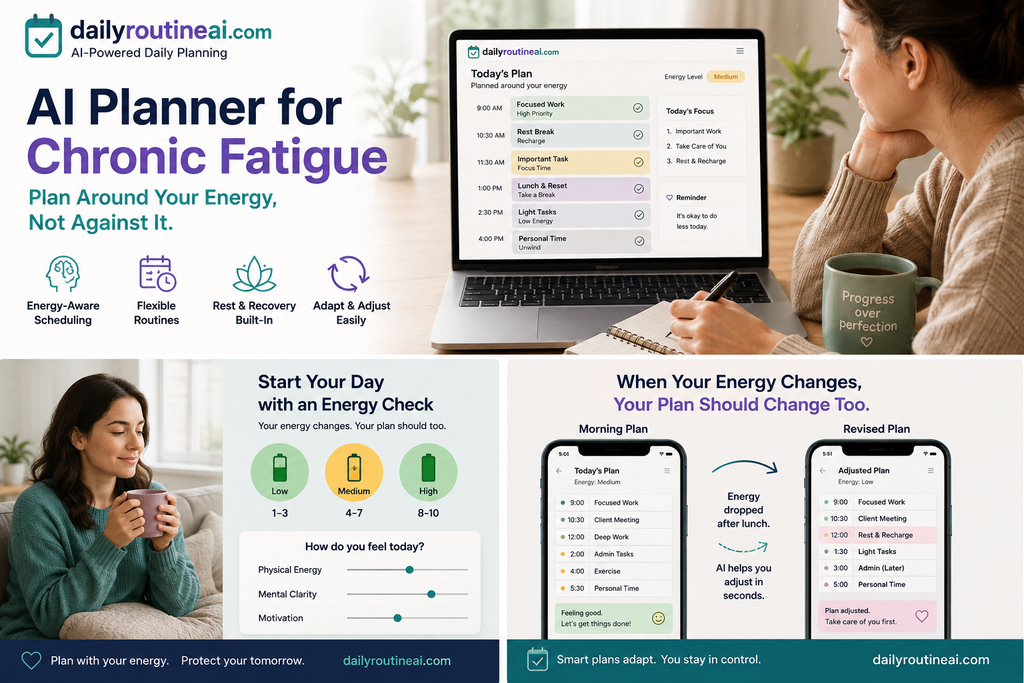
Start the Day by Checking Your Available Energy
Before building a detailed schedule, consider how much capacity you have available.
There is no single rating system that everyone needs to use. Some people may prefer low, medium, and high. Others may find a simple numerical scale easier.
The purpose is not to turn your day into a complicated tracking exercise.
It is simply another piece of information that can influence the plan.
Consider two versions of the same day.
Higher-capacity day
You may decide that you can handle an important work task, an appointment, preparing food, and one small household responsibility.
Lower-capacity day
The appointment and essential work may stay on the schedule while cleaning, administration, or other flexible tasks move to another day.
The responsibilities have not changed.
The schedule has.
That distinction is important because a routine should reflect the day you actually have rather than the day you wish you had.
Separate Essential Tasks From Optional Tasks
One of the easiest ways to make a daily plan more manageable is to stop treating every task as equally important.
A simple structure is:
| Category | What it means |
|---|---|
| Essential | Needs attention today |
| Flexible | Important but can move |
| Optional | Useful if capacity remains |
This does not mean optional activities have no value.
An enjoyable activity can still be important. The purpose of categorization is to make it easier to decide what stays when the available capacity is limited.
For example, paying a bill due today is different from organizing a cupboard.
Replying to an urgent work message is different from clearing an old email inbox.
Preparing food is different from deep-cleaning the kitchen.
An AI planner can help sort these activities so that the schedule reflects their actual priority.
The result is not necessarily fewer responsibilities overall.
It is a clearer decision about what belongs on today’s schedule.
Create a Low-Energy Version of the Daily Routine
A routine should not only work on your better days.
It can also help to have a simpler version for days when your capacity is lower.
Imagine your normal task list contains:
- Work
- Grocery shopping
- Cooking
- Housework
- Personal administration
- Reading
On a lower-capacity day, the plan might keep the essential responsibilities while moving housework and administration to another day.
That does not mean the routine has failed.
It means the routine adapted.
The same principle can be used when breaking larger responsibilities into smaller pieces. Instead of treating “clean the house” as one large task, for example, you might divide it into smaller activities and decide which one, if any, belongs on today’s schedule.
The important part is to avoid turning a low-energy routine into another demanding checklist.
A fallback routine should be simpler, not just more compressed.
Build Recovery and Rest Into the Plan
Rest should not always be something added after every task has been completed.
If your schedule is already overloaded, putting rest at the very end does not necessarily make the schedule manageable.
Instead, consider the space between activities when building the routine.
This is especially useful because not all activities place the same type of demand on you.
A task can be physically easy but mentally demanding. Reading, writing, meetings, studying, phone calls, and extended conversations may require concentration even when you are not doing physical work.
A more thoughtful schedule therefore considers different types of activity.
For example, instead of placing several demanding tasks next to each other, you might separate them with a lower-demand activity or planned downtime.
There is no universal amount of rest that belongs in every person’s schedule. The useful approach is to make the plan flexible enough to accommodate the individual’s needs.
What to Do When Your Energy Changes Midday
Your morning schedule does not have to control the rest of your day.
If your capacity changes at midday, reassess the remaining tasks.
Imagine your original schedule looks like this:
9:00 — Work task
10:30 — Household task
12:00 — Lunch
1:00 — Appointment
3:00 — Administration
4:00 — Reading
Now suppose the morning work task takes considerably more effort than expected.
The answer does not have to be squeezing the missed household task into another part of the afternoon.
You could instead rebuild the remaining schedule:
9:00 — Work task
10:30 — Lower-demand period
12:00 — Lunch
1:00 — Appointment
After appointment — Essential administration only
Remaining tasks — Move to another day
This is one of the practical advantages of using AI for planning.
You can give it an updated situation and ask it to reorganize the rest of the day rather than manually rebuilding everything.
The important part is that the AI should respond to your new information rather than forcing you to follow the original schedule.
Example: Turning a Long To-Do List Into a Manageable Day
Consider this example.
Someone has the following tasks:
- Finish an important work assignment
- Attend an appointment
- Clean the kitchen
- Buy groceries
- Reply to several non-urgent emails
- Do laundry
- Watch a favorite program
Putting everything into one schedule may create an unnecessarily demanding day.
Instead, the tasks can first be categorized.
| Task | Possible planning category |
|---|---|
| Appointment | Essential |
| Important work assignment | Essential |
| Food/groceries | Depends on circumstances |
| Kitchen cleaning | Flexible |
| Non-urgent emails | Flexible |
| Laundry | Flexible |
| Favorite program | Optional |
The final routine depends on the person’s actual circumstances and available capacity.
That is important because this is a planning example, not a real DailyRoutineAI user case study.
No genuine DailyRoutineAI user results, testimonials, or personal case data were provided for this article, so they should not be presented as though they exist.
If you later have real testing data from DailyRoutineAI, this section would be a strong place to add it.
Using AI Without Letting the Planner Control Your Day
AI can organize information quickly, but it does not know everything happening in your life.
It does not automatically know that an appointment ran late, that you slept poorly, that a conversation was more demanding than expected, or that a task turned out to be harder than it looked.
That is why an AI-generated schedule should always be treated as a starting point.
Think of the process this way:
You provide the situation.
AI organizes the options.
You decide what actually fits.
This becomes particularly important when planning around chronic fatigue.
An AI planner should not tell someone how to treat a medical condition or decide how much activity they should perform.
Its role is much simpler: help organize the information and create a routine that the user can review and change.
How to Make an AI Daily Routine More Sustainable
A sustainable routine is not necessarily the one with the most completed tasks.
It is the one that remains realistic when circumstances change.
That means avoiding schedules that depend on every task taking exactly the expected amount of time.
It also means leaving room for unexpected responsibilities, changes in capacity, and unfinished work.
At the end of the day, a short review can help improve future planning.
Ask:
- Which tasks actually needed to happen today?
- Which tasks could have waited?
- Was the schedule too full?
- Which activities required more effort than expected?
- Was there enough space between demanding tasks?
- What should be changed tomorrow?
The purpose of this review is not to judge yourself based on how many boxes you checked.
It is to make the next routine more realistic.
Over time, this can help turn daily planning into a process of adjustment rather than a daily test of productivity.
Common Mistakes When Using an AI Planner for Chronic Fatigue
Scheduling every available hour
A calendar can look perfectly organized while leaving no room for real life.
Space is not automatically wasted time.
It can give the rest of the schedule room to breathe.
Treating a good day as the new normal
A day when you can accomplish more does not necessarily mean you should permanently increase your workload.
Planning should consider patterns over time rather than basing the next schedule entirely on your best day.
Ignoring cognitive activity
A schedule can look physically easy while still being mentally demanding.
Writing, reading, meetings, studying, and extended conversations can all require concentration.
Carrying every unfinished task forward
If every unfinished task automatically moves to tomorrow, the workload can grow quickly.
Sometimes the better decision is to postpone, remove, delegate, or reconsider a task.
Treating AI recommendations as medical advice
An AI planner can help organize a day.
It cannot determine the cause of chronic fatigue or tell you what medical treatment is appropriate.
People experiencing persistent or significant fatigue should seek appropriate professional guidance rather than relying on a planning tool to manage a medical condition.
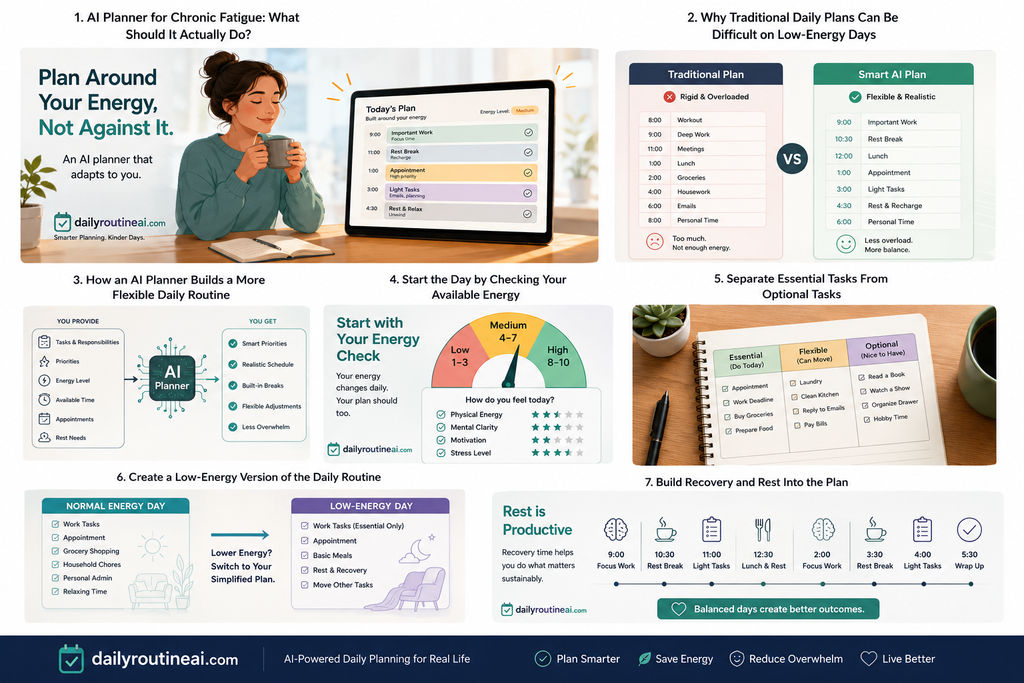
AI Planner for Chronic Fatigue: A Practical Daily Planning Workflow
A straightforward workflow can look like this.
Step 1: Check your current capacity
Use a simple method that makes sense to you.
Step 2: List today’s responsibilities
Write down everything competing for your attention.
Step 3: Identify what is genuinely essential
Separate today’s requirements from tasks that can move.
Step 4: Consider the demands of each task
Think about physical effort, concentration, time, and other demands.
Step 5: Ask AI to create a first draft
Give the planner enough information about your priorities and limitations.
Step 6: Review the schedule yourself
Remove or change anything that does not feel realistic.
Step 7: Leave room between demanding activities
Do not assume every minute needs to be filled.
Step 8: Reassess when circumstances change
If your capacity changes, rebuild the remaining part of the day.
Step 9: Move unfinished tasks deliberately
Do not automatically carry everything into tomorrow.
Step 10: Review the routine
Use what you learned to make the next plan more realistic.
This process keeps the human in control while allowing AI to handle much of the organizational work.
AI Planner vs. Traditional Planner for Fatigue-Aware Daily Planning
The biggest difference is not that AI can produce a nicer-looking schedule.
A traditional planner gives you a place to organize your own plan. AI can help you construct and reconstruct that plan when circumstances change.
| Feature | Traditional Planner | AI Daily Planner |
|---|---|---|
| Basic task organization | Yes | Yes |
| Prioritization | Usually manual | Can assist |
| Flexible rescheduling | Usually manual | Can reorganize the plan |
| Energy or capacity as an input | Manual | Can be included |
| Low-capacity routine | Usually created manually | Can generate an alternative |
| Midday changes | Manual edits | Can rebuild remaining tasks |
| Personalized schedule | User creates it | AI can create a first draft |
| Human judgment | Essential | Essential |
This should not be interpreted as evidence that AI is medically better than a traditional planner.
The advantage is mainly convenience and adaptability.
Instead of manually rearranging a schedule every time something changes, you can provide the new information and ask the AI to create another version.
FAQs About AI Planners for Chronic Fatigue
Can an AI planner create a routine around changing energy levels?
Yes. You can provide information about your current capacity, responsibilities, priorities, and available time. The AI can then create a schedule based on those inputs.
The schedule should still be reviewed and adjusted by you.
Can I create a low-energy version of my routine?
Yes. You can ask an AI planner to identify essential responsibilities and move flexible activities to another day.
The goal should be to create a simpler routine rather than squeezing the same workload into less time.
Can AI help prioritize essential tasks?
Yes. You can provide criteria such as urgency, importance, deadlines, flexibility, and estimated effort.
The result should be reviewed because AI does not automatically understand every personal priority.
Can an AI planner reschedule unfinished tasks?
Yes. You can give the planner your updated situation and ask it to rebuild the remaining schedule.
This can be more practical than automatically adding every unfinished task to the next day.
How can I avoid overloading my daily schedule?
Start by identifying what genuinely needs to happen today.
Then consider how demanding each task is and leave enough space between activities.
The goal is to create a schedule that is realistic rather than one that looks impressive on paper.
Can an AI planner include rest periods?
Yes. Rest can be included as part of the daily routine.
However, there is no universal amount of rest that works for everyone. The schedule should remain adjustable.
Can AI help identify patterns in daily activities?
AI can help organize information from a personal activity or symptom diary and make the information easier to review.
However, the quality of the result depends on the information being tracked, and AI should not be treated as a diagnostic tool.
Should an AI planner replace medical advice?
No.
An AI planner is a planning and organization tool. It should not diagnose chronic fatigue, determine its cause, or replace appropriate professional care.
Can the same planning method work when energy changes throughout the day?
The general approach can be adapted to changing capacity.
The actual schedule, however, needs to reflect the person’s circumstances and limitations rather than following a universal routine.
Final Thoughts
An AI planner for chronic fatigue should not be about squeezing more work into every available hour.
It should make daily planning more flexible.
Start with what you actually need to do. Identify the essential tasks. Consider your available capacity. Build a realistic routine, then change it when the day changes.
That last part is often overlooked.
Your schedule is supposed to support your day. Your day does not have to conform to a schedule that no longer makes sense.
For a tool such as DailyRoutineAI, that creates a straightforward role: help people turn a changing list of responsibilities into a daily routine that is easier to understand, adjust, and manage.
And when fatigue is persistent, severe, unexplained, or interfering substantially with normal life, planning software should remain a support tool alongside appropriate professional care—not a substitute for it.